

- An SEO checklist is a repeatable list of checks that makes sure search engines can crawl, index, understand and trust your pages.
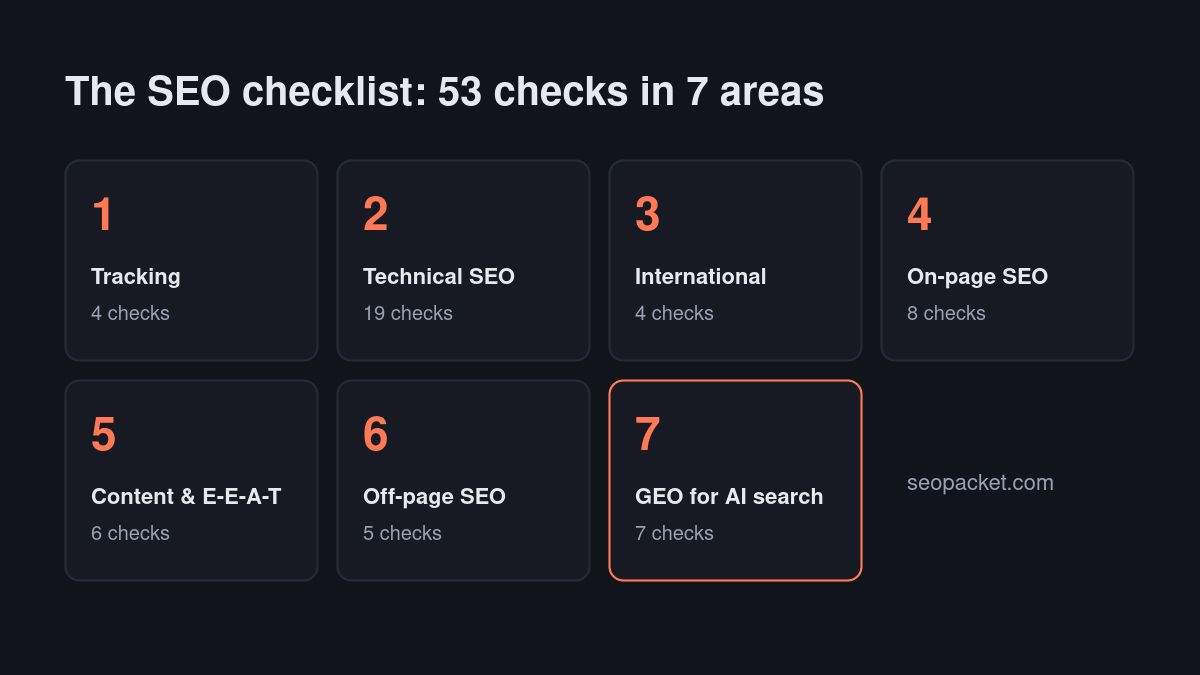
- Work in order: tracking first, then technical SEO, international setup, on-page SEO, content quality, off-page signals, and finally GEO for AI search.
- Most ranking problems on new sites are technical: a stray noindex tag, a blocked folder in robots.txt, or pages with no internal links.
- Run the full SEO checklist when you launch or redesign, then a lighter check every month and after every major content update.
In this SEO checklist
Most sites that struggle in search aren’t missing a clever trick. They’re missing a basic: a page Google was told not to index, a sitemap that lists redirects, a title tag copied across fifty pages. This SEO checklist walks through all 53 checks in the order that matters, from getting Google to see your pages at all, to getting AI assistants like ChatGPT and Perplexity to quote them.
Each section below is self-contained, so you can jump to the part you need. If you’re launching a new site, start at the top and work down; if you’re fixing an existing site, run the technical section first, because it catches the problems that make every other fix pointless.
What is an SEO checklist?
An SEO checklist is a structured list of checks that confirms a website meets the requirements search engines use to crawl, index and rank pages. It covers technical setup, on-page elements, content quality and off-page signals, so nothing important is skipped when you launch, redesign or audit a site.
A good SEO checklist does two jobs. The first time, it’s an audit: you work through every item and fix what fails. After that, the technical and on-page sections become a pre-publish routine for every new page, which is where most long-term gains come from. This one also covers generative engine optimization (GEO), because a growing share of searches now end inside an AI answer rather than a list of links.
Set up tracking first
You can’t fix what you can’t see. Before changing anything, make sure you’re collecting data from the search engines themselves, so every later item on the SEO checklist can be measured.
- Google Search Console: verify your domain property and submit your XML sitemap.
- Bing Webmaster Tools: import your site from Search Console in one click. Bing’s index also feeds ChatGPT search and Microsoft Copilot.
- Analytics: install Google Analytics 4 or a privacy-friendly alternative so you can see which pages turn visits into sign-ups or sales.
- A baseline: note today’s indexed pages, clicks, impressions and average position so you can measure every change against it.
Technical SEO checklist
Technical SEO decides whether search engines can reach and understand your pages. Fix these items before spending time on content, because a great page that can’t be indexed earns nothing. This is also the part of the SEO checklist where one small mistake, such as a single line in robots.txt, can hide an entire site.
Crawling and indexing
- Check
robots.txtdoesn’t block pages, CSS or JavaScript you need indexed. Google’s robots.txt introduction explains exactly what each rule does. - Make sure no important page carries a
noindexmeta tag or X-Robots-Tag header. This is the most common cause of pages vanishing after a site launch. - Submit one clean XML sitemap that lists only indexable, canonical URLs that return HTTP 200, with no redirects or 404s. See Google’s sitemap guidelines.
- Inspect key URLs in Search Console and read the exact reason for any page marked “Crawled – currently not indexed” or “Discovered – currently not indexed”.
- Set a self-referencing canonical tag on every page, and point duplicates (filters, tracking parameters, print versions) to the main version, following Google’s guide to consolidating duplicate URLs.
- If your site relies on JavaScript to show content, confirm the rendered HTML in URL Inspection contains your main text and links, not an empty shell.
Site structure and links
- Every important page should be reachable within three clicks of the homepage.
- No orphan pages: each page needs at least one internal link from a page that’s already indexed.
- Fix broken internal links and redirect chains; link straight to the final URL.
- Use short, descriptive, lowercase URLs with hyphens, for example
/seo-checklist/. - Add breadcrumbs so both people and search engines can see where a page sits in your site.
Speed, mobile and security
- Serve the whole site over HTTPS, and 301-redirect HTTP and the non-preferred www or non-www version.
- Pass Core Web Vitals at the 75th percentile of real visits: Largest Contentful Paint 2.5 seconds or less, Interaction to Next Paint 200 ms or less, Cumulative Layout Shift 0.1 or less.
- Give every image explicit width and height, serve modern formats such as WebP or AVIF, and lazy-load images below the fold.
- Test on a real phone. Google indexes the mobile version of your pages, so content hidden or missing on mobile effectively doesn’t exist.
- Monitor server errors (5xx) and uptime. Repeated errors make Google crawl your site less often.
Structured data
- Add Organization and WebSite schema sitewide, and Article or BlogPosting schema on posts.
- Use BreadcrumbList, FAQPage, Product or SoftwareApplication schema only where the page genuinely contains that content.
- Validate every template with Google’s Rich Results Test. Invalid JSON-LD is ignored entirely.
You can run most of this part of the SEO checklist in one pass with a site crawler. SEOPacket’s Site auditor crawls your site for free and puts the three biggest problems first, and its Indexing module explains in plain words why any page isn’t indexed.
International SEO checklist
If you serve readers in more than one country, for example the US, UK, Canada, India, Pakistan, Bangladesh and the UAE, a few extra checks stop search engines from showing the wrong version to the wrong audience. A single English site that serves everyone can skip hreflang, but should still get the rest of this right.
- If you publish separate language or regional versions, add hreflang annotations that point each version at every other, including an
x-default, as described in Google’s guide to localized versions. - Give each language or region its own URL (a subfolder such as
/uk/or a separate domain), never the same URL with content swapped by cookie. - Localize what matters to the reader: spelling, currency, units, examples and contact details, not just the language.
- Don’t automatically redirect visitors based on their IP address. Search engine crawlers mostly crawl from the US and would never see your other versions; offer a clear country switcher instead.
On-page SEO checklist
On-page SEO tells search engines what each page is about and persuades people to click. Run this section of the SEO checklist on every page you want to rank, and again whenever you update one.
- Match search intent. Search your target keyword and look at what ranks. If the top results are how-to guides, a product page won’t compete, and vice versa.
- Title tag. Unique, about 50–60 characters, with the main keyword near the start and a reason to click.
- Meta description. Unique, roughly 140–160 characters, summarising what the reader gets. It doesn’t affect rankings directly, but it affects clicks.
- One H1. A single, clear H1 that matches the topic, with H2 and H3 headings in a logical order underneath.
- Keyword in the first paragraph. Say plainly what the page covers early on, without forcing the exact phrase.
- Internal links. Link to related pages with descriptive anchor text, and link back to the page from relevant older posts.
- Images. Descriptive file names, alt text that explains the image, and compressed file sizes.
- Open Graph tags. Set og:title, og:description and a raster og:image (PNG or JPG, 1200×630) so shared links show a proper preview.
Content quality and E-E-A-T checklist
Google’s quality guidelines describe good content in terms of E-E-A-T: experience, expertise, authoritativeness and trustworthiness. Its guidance on creating helpful, reliable, people-first content is worth reading in full. You can’t add E-E-A-T with a plugin, but you can make it visible.
- Show a real author name and a short bio that explains why they’re qualified to write about the topic.
- Show the published date and the last updated date, and actually update posts when facts change.
- Add first-hand detail: screenshots, real numbers from your own tests, and specific examples rather than generic advice.
- Cite primary sources such as official documentation when you make factual claims.
- Remove or merge thin pages that repeat the same point, so every indexed page earns its place.
- Publish clear About, Contact, Privacy and Terms pages so visitors and search engines can see who stands behind the site.
Off-page SEO checklist
Off-page SEO is everything outside your site that signals it can be trusted: links, mentions and your brand’s footprint across the web. It’s the slowest part of any SEO checklist to show results, so start it early.
- Earn links from relevant, reputable sites through useful content, original data or tools. Avoid buying links or joining link schemes.
- Create consistent brand profiles (LinkedIn, X, GitHub, YouTube, industry directories) with the same name, logo and description.
- Get listed in the directories and review sites your customers actually use, and ask real customers for honest reviews.
- Check your backlink profile regularly for lost links worth reclaiming and broken pages that still attract links.
- Look for unlinked brand mentions and politely ask the author to add a link.
Quality beats quantity here. One link from a respected site in your niche does more than dozens from unrelated directories, and a sudden burst of low-quality links can do real harm. The same logic now applies to AI search: assistants tend to cite the sources other reputable pages already reference, so being mentioned in a well-known “best tools” roundup or an industry guide can do more for your AI visibility than any change you make on your own site. Treat every link and mention as a relationship with a real audience, not a number in a report.
GEO checklist for AI search
Generative engine optimization (GEO) extends the SEO checklist to AI answer engines such as ChatGPT search, Perplexity, Claude and Google AI Overviews. These engines quote pages rather than ranking them, so the goal is to be the clearest, most citable source on a topic. Read GEO vs SEO for the full background.
- Allow AI search crawlers in robots.txt: OAI-SearchBot (ChatGPT search), PerplexityBot, Claude-SearchBot and Googlebot. Blocking training-only crawlers such as GPTBot is a separate, legitimate choice.
- Don’t use
nosnippetormax-snippet:0on pages you want quoted in AI Overviews. - Phrase headings as the questions people ask, and answer each one in the first one or two sentences underneath.
- Define key terms in a single sentence, and include specific facts, numbers and comparisons an AI can quote.
- Add Organization schema with your name, URL, logo and profile links so AI engines can identify your brand as an entity.
- Publish an
llms.txtfile at your site root that summarises your most important pages. - Track whether AI assistants actually cite you for the questions your customers ask.
SEOPacket’s GEO readiness score checks all of these for free and scores a page from 0 to 100, and its AI answer checks show whether AI search cites your brand as a source.
SEO checklist for a new website launch
Launch day is when the most expensive SEO mistakes happen, usually because a setting that was right on the staging site gets copied to the live one. Before you announce a new site, run this short version of the SEO checklist:
- Turn off “Discourage search engines from indexing this site” (or remove the staging noindex) and confirm the live robots.txt allows crawling.
- Check that every old URL 301-redirects to its closest new page if you’re replacing an existing site.
- Submit the new sitemap in Google Search Console and Bing Webmaster Tools.
- Inspect the homepage and your three most important pages, and request indexing for each.
- Crawl the whole site once to catch broken links, missing titles and duplicate descriptions before visitors do.
Common SEO checklist mistakes
An SEO checklist only helps if it’s used the right way. These are the mistakes that most often undo the work:
- Treating it as a one-off. Sites change constantly: plugins update, pages are added, redirects pile up. A checklist run once at launch is out of date within months.
- Fixing easy items first. Polishing meta descriptions while key pages are blocked by noindex wastes effort. Always clear technical blockers first.
- Chasing tool scores instead of outcomes. A 100/100 plugin score doesn’t guarantee rankings. Judge changes by indexed pages, clicks and conversions in Search Console.
- Keyword stuffing to pass a check. Repeating a phrase unnaturally makes content worse for readers and AI engines alike. Write for the question first.
- Ignoring AI search. A page can rank well and still never be cited by ChatGPT or Perplexity if it has no direct answers or blocks AI crawlers.
How often should you run an SEO audit?
Run the full SEO checklist when you launch, redesign or migrate a site, then a lighter monthly check of indexing, broken links and Core Web Vitals. Re-check individual pages whenever you publish or significantly update them. Large sites that publish daily benefit from weekly crawls, and any sudden drop in Search Console clicks is a signal to run the technical section immediately.
The SEO checklist at a glance
| Area | Check | How often |
|---|---|---|
| Tracking | Search Console, Bing Webmaster Tools, analytics, sitemap submitted | Once, then keep verified |
| Crawling | robots.txt, noindex tags, canonical tags, clean XML sitemap, rendering | Monthly and after every deploy |
| Indexing | URL Inspection on key pages, Page indexing report | Monthly |
| Structure | Internal links, orphan pages, broken links, redirects | Monthly |
| Performance | Core Web Vitals, image sizes, HTTPS, mobile, server errors | Monthly |
| International | hreflang, regional URLs, localization, no IP redirects | When adding a market |
| On-page | Intent, title, meta description, H1, headings, alt text | Every new or updated page |
| Content | Author, dates, sources, thin or duplicate pages | Quarterly |
| Off-page | Backlinks, brand profiles, reviews, mentions | Monthly |
| GEO | AI crawler access, question headings, entity schema, llms.txt, AI citations | Monthly |
Frequently asked questions
What should an SEO checklist include?
A complete SEO checklist covers tracking setup, technical SEO (crawling, indexing, site structure, speed and structured data), international setup if you serve several countries, on-page SEO (titles, descriptions, headings and internal links), content quality, off-page signals such as backlinks, and GEO checks for AI search engines.
How long does it take for SEO changes to show results?
Technical fixes such as removing a noindex tag can show up within days once Google recrawls the page. Content and ranking improvements usually take several weeks to a few months, depending on competition and how often Google crawls your site.
What’s the difference between technical SEO and on-page SEO?
Technical SEO makes sure search engines can crawl, render and index your site, and covers robots.txt, sitemaps, canonicals, speed and structured data. On-page SEO optimises the content and HTML of individual pages, such as titles, headings and internal links, so they match what searchers want.
Do I need a paid tool to follow an SEO checklist?
No. Google Search Console, Bing Webmaster Tools and PageSpeed Insights are free, and SEOPacket’s site crawls, indexing checks and GEO readiness score are free too. Paid tools mainly save time on rank tracking, keyword research and backlink analysis.
Does this SEO checklist work for WordPress sites?
Yes. Every item applies to WordPress. Most can be handled with an SEO plugin such as Rank Math or Yoast plus a caching plugin, and the rest are settings in Search Console and your hosting control panel.