

- WordPress SEO plugins handle the technical basics WordPress leaves out: title tags, meta descriptions, XML sitemaps, canonical tags, schema, breadcrumbs and social tags.
- Rank Math, Yoast SEO, All in One SEO and SEOPress are the full-featured options. The SEO Framework and Slim SEO are lighter plugins that automate more and ask less of you.
- Use one SEO plugin only. Two SEO plugins running together duplicate titles, canonicals and schema.
- The plugin is a tool, not a strategy. Its score can’t tell you whether your page matches search intent or deserves to rank.
WordPress is a good foundation for SEO, but out of the box it leaves gaps. It doesn’t let you write a separate title tag and meta description for each page, its built-in sitemap is basic, and it adds no structured data. WordPress SEO plugins fill those gaps, and choosing one is one of the first decisions on any new site.
This guide compares six WordPress SEO plugins we’d consider in 2026: what each does for free, what you pay extra for, how heavy it is and who it suits. We run Rank Math on this site, and the notes on the others come from their documentation and WordPress.org listings. There are no affiliate links in this article, and plugin features change often, so check each plugin’s page on WordPress.org before you decide.
In this WordPress SEO plugins guide
What do WordPress SEO plugins do?
WordPress SEO plugins add the controls and markup that search engines expect but WordPress doesn’t provide by default. At minimum, a good plugin should:
- Let you set an SEO title and meta description for every post, page, category and product.
- Generate an XML sitemap that lists only the pages you want indexed.
- Add canonical tags and let you noindex thin archives, tags or attachment pages.
- Output structured data (schema) for your organisation, articles, breadcrumbs and more.
- Add Open Graph and X (Twitter) tags so shared links look right.
- Give you a way to verify your site with Google Search Console and Bing Webmaster Tools.
Most WordPress SEO plugins also add a content analysis panel in the editor that scores your page against a focus keyword. That’s useful as a reminder list, but it can’t judge the thing that matters most: whether your page is the best answer to the search. The on-page section of our SEO checklist explains what the score leaves out.
How we compared these WordPress SEO plugins
We looked at each plugin against the same six questions, shown in the chart below.
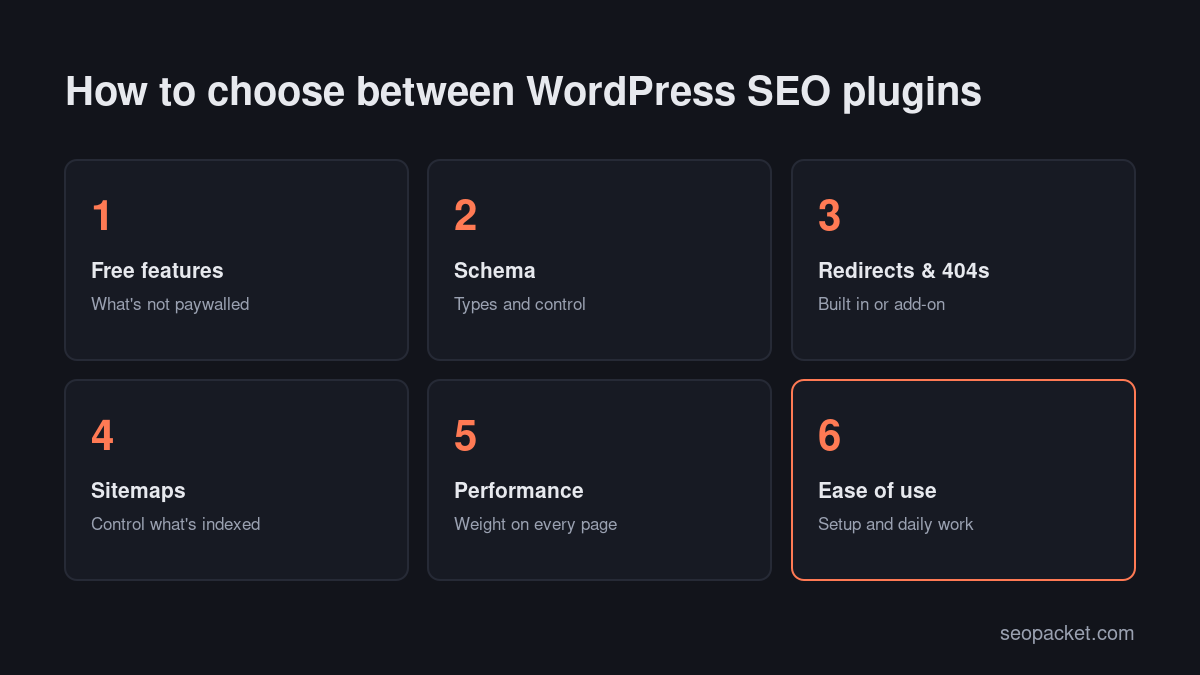
- Free features. How much can you do without paying? Some plugins put redirects or advanced schema behind a paywall.
- Schema. Which types are supported, and how much control do you get?
- Redirects and 404 monitoring. Built in, or do you need another plugin?
- Sitemaps and indexing controls. Can you easily exclude post types, taxonomies and individual pages?
- Performance. How much code does it add to the front end and the admin?
- Ease of use. How long does setup take, and how friendly is it for non-technical writers?
The best WordPress SEO plugins at a glance
| Plugin | Best for | Free version highlights | Paid version adds |
|---|---|---|---|
| Rank Math | Most sites that want lots of features for free | Multiple focus keywords, schema, redirects, 404 monitor, IndexNow | Extra schema types, rank tracking, advanced analytics |
| Yoast SEO | Teams that want a familiar, stable choice | Titles, sitemaps, schema graph, readability analysis | Redirect manager, internal linking suggestions, more keyphrases |
| All in One SEO (AIOSEO) | Beginners and small businesses | Setup wizard, TruSEO analysis, sitemaps, social tags | Redirects, link assistant, local SEO, more schema |
| SEOPress | Agencies and clean admin lovers | Titles, sitemaps, social tags, no ads in the admin | White label, local business schema, redirects, more |
| The SEO Framework | Developers and speed-focused sites | Automated titles, canonicals and schema, very light | Free extensions for more features |
| Slim SEO | Minimalists who want automation | Automatic meta, schema and sitemaps, almost no settings | Pro add-ons for schema and link management |
1. Rank Math
Rank Math packs the most features into its free version of any plugin on this list, which is why so many sites have switched to it. Free, you get up to five focus keywords per post, a schema generator with the common types, a redirection manager, a 404 monitor, breadcrumbs, local SEO basics, Google Search Console data inside WordPress and an Instant Indexing module that pings search engines through IndexNow when you publish.
It’s modular, so you can switch off what you don’t use, which keeps it lighter than its feature list suggests. The paid version adds more schema types, keyword rank tracking and deeper analytics. The main downside is choice: there are a lot of settings, and new users can feel overwhelmed. Its setup wizard helps, and the defaults are sensible.
Choose Rank Math if you want one plugin to handle titles, schema, redirects and 404s without paying.
2. Yoast SEO
Yoast SEO is the plugin many people learned WordPress SEO on, and it’s still one of the most installed plugins in the WordPress directory. The free version covers titles and meta descriptions, XML sitemaps, a well-built schema graph that connects your organisation, website, pages and authors, breadcrumbs and its well-known readability analysis.
Yoast’s strength is stability and simplicity for writers. Its traffic-light system is easy to explain to a content team. The trade-off is that several features other plugins give away, such as redirects and multiple keyphrases, are in Yoast SEO Premium.
Choose Yoast SEO if you want a widely documented, predictable plugin and your team values readability guidance.
3. All in One SEO (AIOSEO)
All in One SEO has been around nearly as long as Yoast and has been rebuilt with a strong focus on beginners. Its setup wizard asks plain questions about your site and configures the rest. The free version includes its TruSEO on-page analysis, sitemaps, social tags and basic schema.
Many of AIOSEO’s more advanced features, including redirects, a link assistant and local business SEO, are in the paid plans, and the free version shows upgrade prompts in the admin. For small businesses that want guided setup and are happy to pay for extras, that’s a reasonable trade.
Choose AIOSEO if you’re new to SEO and want the most guided setup.
4. SEOPress
SEOPress is a popular choice with agencies because its admin is clean, it doesn’t fill the dashboard with ads, and the paid version can be white-labelled. The free version covers titles and meta, XML and HTML sitemaps, Open Graph and X tags, breadcrumbs and content analysis.
SEOPress PRO adds features such as local business schema, redirects and 404 monitoring, WooCommerce enhancements and Google Search Console integration. Pricing is per-site friendly compared with some competitors, which matters when you manage many client sites.
Choose SEOPress if you build sites for clients and want a clean, brandable plugin.
5. The SEO Framework
The SEO Framework takes a different approach: it generates sensible titles, descriptions, canonicals and schema automatically, with very little front-end weight and no upsell ads. You can override anything, but you rarely need to.
It doesn’t include a keyword-score panel by default, which some writers miss and others find freeing. Extra features, such as local SEO or a focus keyword analysis, come as extensions.
Choose The SEO Framework if performance and clean code matter more to you than an editor score.
6. Slim SEO
Slim SEO is the most minimal plugin here. Activate it and it handles meta tags, schema, sitemaps, breadcrumbs and social tags automatically, with almost no settings page to learn. You can still override titles and descriptions per post.
It’s ideal for brochure sites and developers who want the basics done well without a big admin footprint. Larger sites that need advanced schema, redirects or detailed analytics will outgrow it, although paid add-ons cover some of that.
Choose Slim SEO if you want the essentials handled automatically on a small site.
Which WordPress SEO plugin should you choose?
There’s no single best WordPress SEO plugin for everyone, but most sites fall into one of these cases:
- You want the most for free: Rank Math.
- You want the most familiar, documented option: Yoast SEO.
- You’re a beginner who wants hand-holding: AIOSEO.
- You’re an agency managing client sites: SEOPress.
- You care most about speed and clean output: The SEO Framework or Slim SEO.
Any of these six is capable of excellent rankings. Your content, site structure and links matter far more than which of them you pick.
Do you need the paid version?
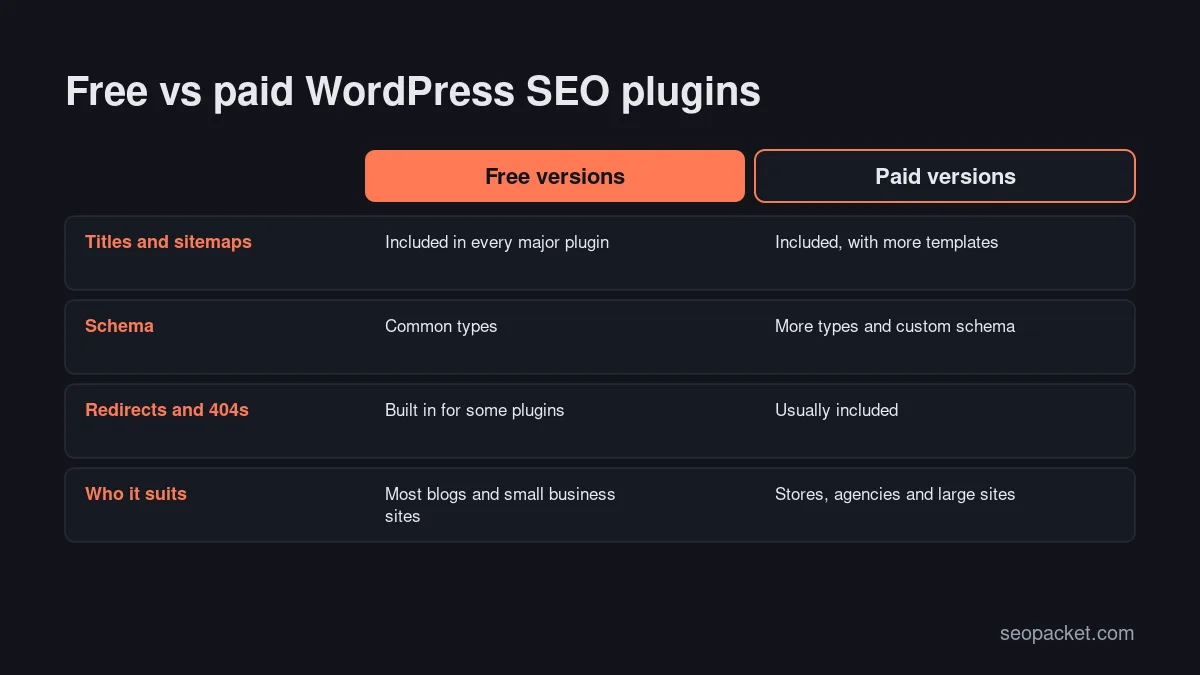
Most sites don’t, at least at first. The free versions of Rank Math, Yoast SEO, AIOSEO and SEOPress all cover titles, descriptions, sitemaps, canonicals, basic schema and social tags, which is what search engines actually need. Paid versions earn their price when you need a specific feature: advanced schema types, local SEO for several locations, WooCommerce enhancements, redirect managers (in plugins that don’t include one for free) or agency features like white labelling. Start free, and upgrade only when you hit a limit that’s costing you time or traffic.
Can you use two SEO plugins at once?
No. Running two WordPress SEO plugins together is one of the most common technical SEO mistakes we see. Both output title tags, canonical tags, schema and sometimes sitemaps, so pages end up with duplicates or conflicts. If you switch plugins, use the new plugin’s import tool, check a few pages, and then deactivate and delete the old one.
Supporting plugins that fill the gaps
An SEO plugin doesn’t do everything. These free plugins cover the rest of a solid WordPress SEO setup:
- Site Kit by Google. Connects Search Console, Analytics and PageSpeed Insights to your dashboard. Available on WordPress.org.
- A caching plugin. LiteSpeed Cache if your host runs LiteSpeed, or your host’s own caching. Speed affects Core Web Vitals, which our guide to Core Web Vitals on WordPress covers in depth.
- An image optimiser. Compresses uploads and serves WebP or AVIF. Some caching plugins include this.
- Redirection. A dedicated redirect manager, if your SEO plugin doesn’t include one.
Keep the list short. Every plugin adds code, and a bloated site is harder to keep fast and secure.
Settings to check after installing any SEO plugin
Whichever of the WordPress SEO plugins you choose, check these settings once it’s installed:
- WordPress visibility. Settings > Reading must not have “Discourage search engines from indexing this site” ticked.
- Sitemap contents. Open your sitemap and make sure it lists posts, pages and important categories, but not tag archives, attachment pages or test content.
- Title templates. Check that the homepage, posts and categories have sensible title patterns with your brand name at the end.
- Organization or Person details. Enter your name, logo and social profiles so schema connects your brand to your site.
- Noindex settings. Noindex thin archives such as tags and date archives unless you’ve built them into useful pages.
- Attachment pages. Redirect them to the file or parent post.
- Search Console and Bing verification. Verify both and submit your sitemap. Our guide to getting indexed by Google walks through it.
Then crawl your site to confirm the plugin is doing what you think. SEOPacket’s free site auditor checks every page’s title, description, canonical, headings, Open Graph tags and indexability, so you can spot template mistakes quickly.
How to switch WordPress SEO plugins safely
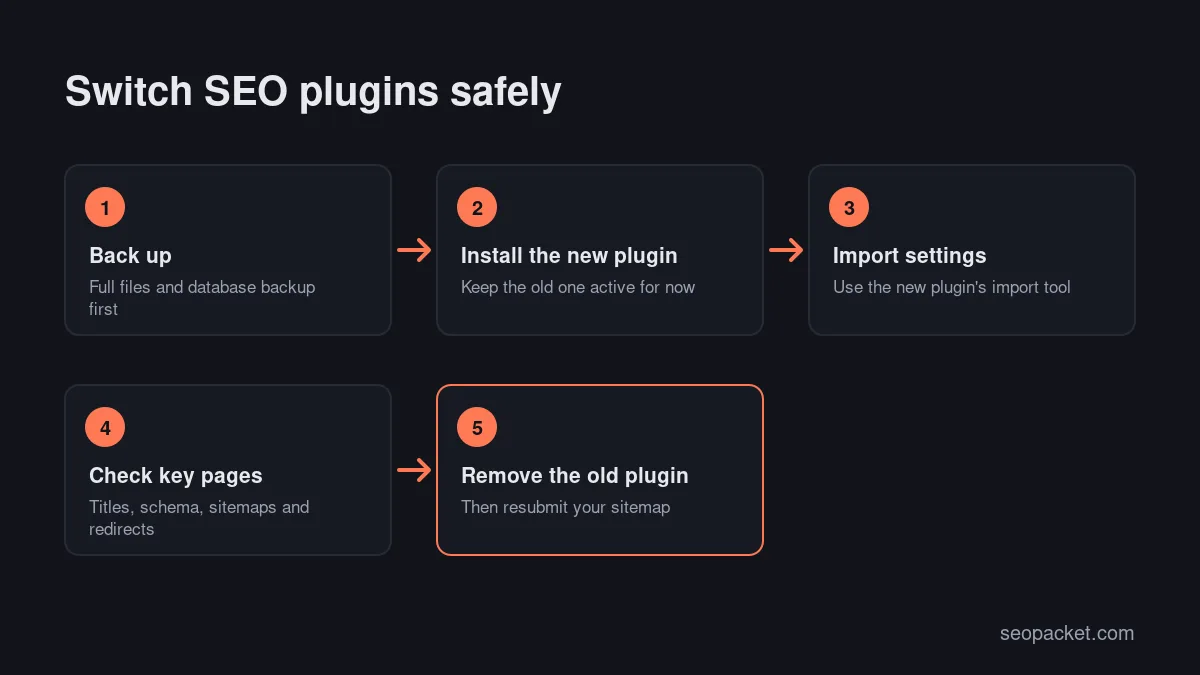
Switching between WordPress SEO plugins is common, for example moving from Yoast to Rank Math for the free redirects, or to a lighter plugin for speed. Done carelessly, it can wipe out hundreds of custom titles and descriptions overnight. Follow these steps:
- Back up your site and database so you can roll back if something goes wrong.
- Crawl the site first. Export every URL with its current title, meta description, canonical and indexability. This is your baseline.
- Install the new plugin and run its import tool before deactivating the old one. Rank Math, AIOSEO and SEOPress can all import settings, titles and descriptions from the other major plugins.
- Check a sample of pages. Compare titles, descriptions, canonicals, schema and robots settings on your homepage, a few posts, a category and a product.
- Deactivate and delete the old plugin. Leaving it installed but inactive is fine for a day or two, but don’t run both.
- Crawl again and compare with your baseline. Look for missing descriptions, changed titles and pages that became noindexed.
- Resubmit your sitemap in Search Console and Bing Webmaster Tools, because the sitemap URL often changes between plugins.
WordPress SEO plugins for WooCommerce stores
Online shops have extra needs. Product pages should output Product schema with price, availability and reviews, category pages need unique titles and descriptions, and filtered or sorted URLs shouldn’t flood the index. All four full-featured plugins here support WooCommerce, with more advanced product schema and controls usually in their paid versions.
Whichever you choose, check three things on a store: that product schema passes the Rich Results Test, that out-of-stock products are handled deliberately rather than returning errors, and that filter parameters are either blocked from crawling or canonicalised to the main category page.
Do SEO plugins help with AI search?
Partly. AI Overviews, ChatGPT search and Perplexity rely on the same foundations as normal search: indexable pages, clear titles, structured data and well-organised content. A good SEO plugin handles the schema and indexing side. What it can’t do is write question-style headings with direct answers, or make sure AI crawlers aren’t blocked in your robots.txt. Our guide to GEO vs SEO covers those extra steps, and SEOPacket’s free GEO readiness score checks them on every page.
Common mistakes with WordPress SEO plugins
- Chasing a green score. Plugins reward keyword placement. A page can score 100 and still not match what searchers want.
- Leaving defaults unchecked. Default title templates and sitemap settings don’t suit every site.
- Installing every module. Switch off features you don’t use.
- Switching plugins without importing. You can lose custom titles and descriptions on hundreds of pages.
- Adding schema by hand as well. Hard-coded JSON-LD on top of plugin schema creates duplicates. Let one source own each type.
Frequently asked questions
What is the best WordPress SEO plugin?
For most sites, Rank Math offers the most features for free, while Yoast SEO is the most familiar and widely documented. AIOSEO suits beginners, SEOPress suits agencies, and The SEO Framework or Slim SEO suit people who want a lightweight, automated plugin.
Do I need an SEO plugin for WordPress?
Not strictly, but it’s strongly recommended. WordPress doesn’t let you set custom title tags and meta descriptions, control your sitemap in detail or add structured data without one, and a plugin handles all of these in a few minutes.
Is Rank Math better than Yoast SEO?
Rank Math includes more features in its free version, such as redirects, multiple focus keywords and a 404 monitor. Yoast SEO is simpler and very stable, with some of those features in Premium. Both can rank a site well.
Can I use Rank Math and Yoast together?
No. Running two SEO plugins at once duplicates title tags, canonicals and schema. Use one, and if you switch, import your settings and then deactivate the old plugin.
Do WordPress SEO plugins slow down my site?
Full-featured plugins add some code, but the impact is usually small compared with themes, page builders and third-party scripts. Disable modules you don’t use, and choose a lightweight plugin if speed is your top priority.

Leave a Reply