

- An on-page SEO checklist is a set of checks you run on each page so it matches search intent and gives search engines and readers clear signals about its topic.
- Start with intent. If the page is the wrong type for the query, no title tag or keyword placement will make it rank.
- The highest-impact on-page checks are a unique title tag, one clear H1, an intro that answers the query, descriptive headings and internal links from related pages.
- Add two checks for AI search: question-style headings with a direct answer underneath, and structured data that matches what’s visible on the page.
Most pages don’t fail in search because of one big mistake. They fail because of ten small ones: a vague title, an intro that takes three paragraphs to get to the point, no internal links pointing in, an image called IMG_2041.jpg. This on-page SEO checklist catches those small mistakes before you publish, and it takes about fifteen minutes per page once you’re used to it.
It’s the on-page companion to our complete SEO checklist. Where that guide covers the whole site, this one focuses on the single page in front of you: a blog post, a service page, a product page or a landing page. Work through it in order, because the early checks decide what the later ones should say.
In this on-page SEO checklist
What is on-page SEO?
On-page SEO is everything you optimise on the page itself to help it rank: the content, the title tag and meta description, headings, URL, internal links, images and structured data. It’s different from technical SEO, which makes sure the whole site can be crawled and indexed, and from off-page SEO, which covers links and mentions from other websites.
Google’s SEO Starter Guide sums up the goal: make it easy for search engines to understand what your page is about, and make the page genuinely useful for the people who land on it. Every item in this on-page SEO checklist serves one of those two purposes.
Why use an on-page SEO checklist?
Because it’s easy to forget things when you publish often. A checklist makes quality consistent across writers and across months. It also makes updates easier: when a page slips in rankings, you can run the same on-page SEO checklist against it and spot what’s missing, rather than rewriting from scratch.
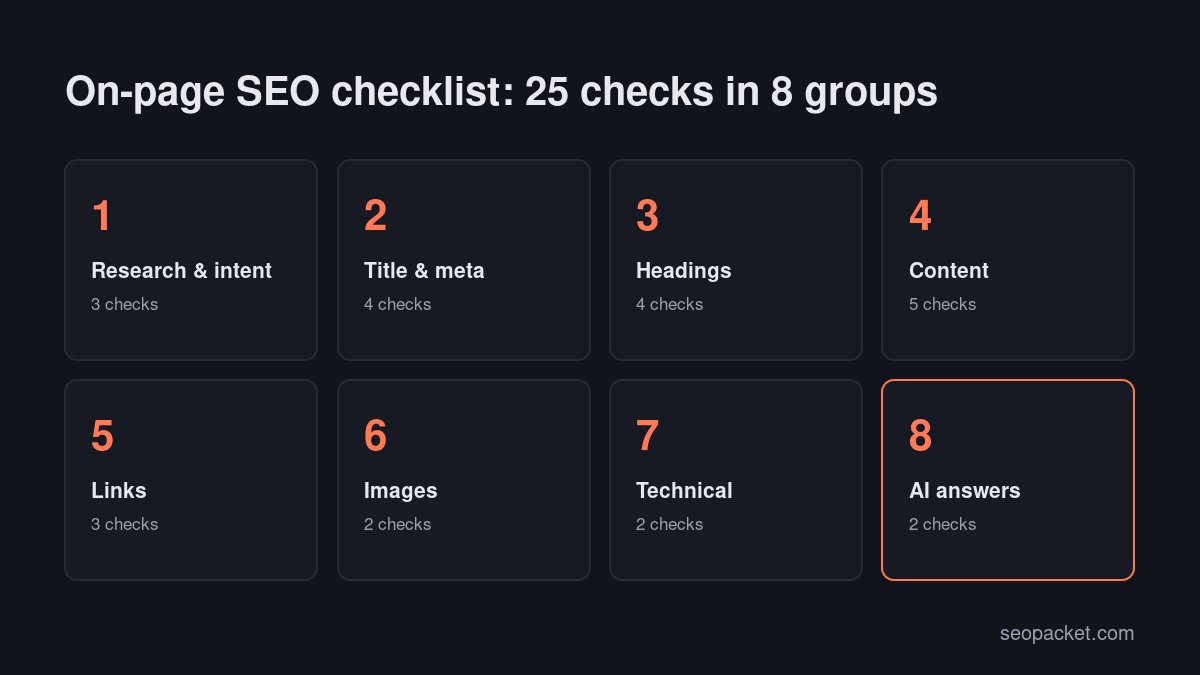
Research and search intent (checks 1 to 3)
- Pick one primary keyword and a few close variants. Each page should target one main topic. If two of your pages target the same keyword, they compete with each other; merge them or give them distinct angles.
- Match the search intent. Search your keyword and look at the top ten. Are they guides, product pages, comparisons, tools or local listings? Your page needs to be the same type. This single check matters more than every other item on the list.
- Note what the top results cover. List the subtopics, questions and formats that appear across the top pages. You’re not copying; you’re making sure you don’t miss something readers expect.
Title tag and meta description (checks 4 to 7)
- Write a unique, descriptive title tag. Put the main keyword near the start, keep it roughly 50 to 60 characters so it isn’t cut off, and make it specific enough to earn the click. Google explains how it chooses titles in its guide to title links.
- Write a meta description that sells the click. Around 140 to 160 characters, including the keyword naturally and a clear reason to read. Google may rewrite it, but a good one is often used.
- Keep the URL short and readable. Use the main keyword with hyphens, for example
/on-page-seo-checklist/. Drop dates and filler words. Don’t change URLs of existing pages without a 301 redirect. - Set social tags. An Open Graph title, description and a 1200 × 630 image make the page look right when shared on LinkedIn, Facebook, X or in chat apps. Most SEO plugins handle this.
Headings and structure (checks 8 to 11)
- Use one H1 that matches the topic. It can differ from the title tag, but it should clearly say what the page is about.
- Structure the page with descriptive H2s and H3s. A reader skimming only the headings should understand the page. Include the keyword or a close variant in at least one subheading, where it reads naturally.
- Answer the main question in the first 100 words. Readers and search engines both reward pages that get to the point. Put the context after the answer, not before it.
- Add a table of contents on long pages. It helps readers jump to what they need and can earn jump links in Google’s results.
Content quality (checks 12 to 16)
- Cover the topic completely, not just the keyword. Include the subtopics you found in check 3, plus anything your experience tells you readers need. Length isn’t a goal in itself, but thin pages rarely satisfy.
- Show real experience. Add examples, screenshots, numbers, mistakes you’ve seen and opinions you can defend. This is what separates a helpful page from a generic one, and it’s central to Google’s guidance on creating helpful, reliable content.
- Name the author and show a date. A visible byline with a short bio and a “last updated” date help readers trust the page. On WordPress, a proper author box does both.
- Write for scanning. Short paragraphs, lists for steps, tables for comparisons and bold text for key terms. Most readers skim before they commit.
- Include the keyword naturally. Use it in the title, H1, intro, at least one subheading and a few times in the body. If a sentence sounds forced, rewrite it. Stuffing keywords hurts more than it helps.
Links (checks 17 to 19)
- Link out to related pages on your own site. Two to five internal links to genuinely related pages help readers go deeper and help search engines understand topic relationships.
- Link in from existing pages. This one gets forgotten. Add links to the new page from two or three of your strongest related pages, using descriptive anchor text. New pages without internal links can take much longer to be crawled and indexed.
- Cite trustworthy external sources. Link to official documentation, original research or primary sources when you make a claim. It helps readers verify what you say.
Images and media (checks 20 to 21)
- Write descriptive alt text and filenames. Describe what the image shows, including the keyword only when it genuinely fits. Google’s image SEO guidance recommends descriptive filenames, alt text and placing images near relevant text.
- Compress and size images. Serve WebP or AVIF where possible, size images to the space they fill and set width and height to prevent layout shift. Heavy images are the most common cause of slow pages.
Technical on-page checks (checks 22 to 23)
- Confirm the page is indexable. No noindex tag, a self-referencing canonical, a 200 status code and inclusion in your sitemap. A quick look at your SEO plugin’s settings for that page usually covers it.
- Add structured data that matches the page. Article or BlogPosting for posts, Product for products, FAQPage only if the questions and answers are visible. Test it in the Rich Results Test. If you’d rather not write JSON-LD by hand, the free schema markup generator from Soft Learn Hub (the company behind SEOPacket) builds it for you.
AI answer checks (checks 24 to 25)
AI Overviews, ChatGPT search and Perplexity quote pages that answer questions clearly. Two checks make your pages easier to quote.
- Phrase key subheadings as questions and answer them straight away. “How long does indexing take?” followed by a one or two sentence answer is exactly the pattern AI engines lift into their responses.
- Make sure your entity is clear. Organization schema sitewide, a named author and consistent brand details help AI engines connect the page to you. Our guide to GEO vs SEO explains how AI engines pick sources.
SEOPacket’s free page audit checks titles, meta descriptions, canonicals, Open Graph, headings, alt text and broken links on any URL, and its GEO readiness score covers checks 24 and 25.
On-page SEO checklist for different page types
The 25 checks apply everywhere, but the emphasis changes with the page type.
Blog posts and guides
Focus on intent, depth and structure. Answer the question early, use question-style headings, add a table of contents, and link to your related guides and the product pages they naturally lead to. Update the post when the facts change, and change the visible “updated” date only when you’ve made real changes.
Service and landing pages
Focus on clarity and conversion. The H1 should say exactly what you offer and who it’s for. Add proof (reviews, case studies, logos), a clear call to action above the fold, and answers to the objections buyers raise. Keep the page focused on one service; separate services deserve separate pages.
Product and category pages
Focus on unique descriptions, product schema and internal links. Manufacturer descriptions copied across hundreds of shops add nothing. Write your own, include specifications in a table, and make sure category pages have a short intro and link to their most important products.
Local pages
Include your business name, address and phone number, consistent with your Google Business Profile, plus an embedded map, local reviews and details specific to that area. Avoid near-identical pages for dozens of towns with only the place name swapped.
How to use this on-page SEO checklist on existing pages
On-page SEO isn’t only for new content. Your existing pages are often a faster win, because they’re already indexed and may already rank on page two.
- Find pages worth improving. In Search Console’s Performance report, filter to pages with plenty of impressions but a low click-through rate or an average position between 8 and 20.
- Check intent first. Look at what ranks now. If the results have changed format since you published, your page may need restructuring, not polishing.
- Run the checklist. Work through all 25 checks and note what’s missing.
- Update, don’t just tweak. Add missing subtopics, refresh examples and screenshots, tighten the intro and add internal links from newer pages.
- Request indexing and measure. Use URL Inspection to request a recrawl, then compare clicks and position over the next four to eight weeks.
On-page SEO in WordPress
If you publish on WordPress, an SEO plugin such as Rank Math or Yoast SEO handles several of these checks for you, and shows the rest as a score in the editor. That’s useful, but treat the score as a reminder list, not a goal. A page can hit 100 in a plugin and still fail check 2, because no plugin can tell whether your page matches what searchers want.
A few WordPress-specific tips for this on-page SEO checklist:
- Set the SEO title and description in the plugin’s snippet editor, not just the post title. The post title becomes your H1; the SEO title becomes the title tag.
- Use the block editor’s heading levels properly. Choose H2 and H3 from the block toolbar rather than making text bold and large.
- Add a Table of Contents block on long posts. Rank Math and most SEO plugins include one that builds itself from your headings.
- Fill in the author profile. A real name, photo and short bio in Users > Profile power the author box and author schema.
- Check image sizes on upload. WordPress creates several sizes automatically, but it won’t compress an oversized original for you. Compress before uploading or use an image optimisation plugin.
- Keep speed in mind. Every block, embed and plugin you add to a page has a cost. Our guide to Core Web Vitals on WordPress covers the fixes that matter most.
How to measure on-page SEO results
Give each change time to be crawled before judging it. After publishing or updating a page, use URL Inspection in Search Console to check that Google has indexed the latest version; our guide to getting pages indexed by Google explains what to do if it hasn’t.
Then watch four numbers in the Performance report, filtered to that page: impressions, clicks, click-through rate and average position. Rising impressions usually come first, as Google tests the page for more queries. Rising click-through rate tells you the title and description are working. If impressions grow but clicks don’t, go back to checks 4 and 5. If nothing moves after six to eight weeks, go back to check 2 and look again at intent.
Whether you call it an on page SEO checklist, a content brief or a pre-publish review, the value comes from running it every time.
Common on-page SEO mistakes
- Duplicate title tags. Templates that give every page the same title are surprisingly common. Crawl your site to find them.
- Keyword stuffing. Repeating the exact phrase in every paragraph reads badly and can hurt rankings.
- Burying the answer. Long introductions push the useful part below the fold, and readers leave.
- Orphan pages. A new post with no internal links pointing to it may sit undiscovered for weeks.
- Decorative alt text. “image1” or a list of keywords helps nobody, including screen reader users.
- Schema that doesn’t match the page. FAQ markup for questions that aren’t visible can be ignored or treated as spam.
On-page SEO checklist at a glance
| Group | Checks | Quick test |
|---|---|---|
| Research and intent | Primary keyword, intent, subtopics | Compare with the top ten results |
| Title and meta | Title tag, description, URL, social tags | SERP preview in your SEO plugin |
| Headings | One H1, descriptive H2s, answer first, TOC | Read only the headings |
| Content | Depth, experience, author and date, scannable, natural keywords | Would you bookmark it? |
| Links | Internal out, internal in, trusted external | Count links in and out |
| Images | Alt text, filenames, compression, sizes | PageSpeed Insights |
| Technical | Indexable, canonical, schema | URL Inspection, Rich Results Test |
| AI answers | Question headings with direct answers, clear entity | GEO readiness score |
Run this on-page SEO checklist on your next page before you publish it. If you want a second pair of eyes, SEOPacket’s page audit and GEO score are free, and new accounts get a $1 credit for paid checks like rank tracking and keyword research.
Frequently asked questions
What is included in an on-page SEO checklist?
An on-page SEO checklist covers search intent and keyword choice, the title tag and meta description, URL, headings, content quality, internal and external links, image alt text and compression, indexability, structured data and, increasingly, question-style headings with direct answers for AI search.
What is the most important on-page SEO factor?
Matching search intent. If your page is a different type from what ranks for the query, for example a sales page where Google shows guides, optimising titles and keywords won’t be enough.
How many times should I use my keyword on a page?
There’s no fixed number. Use it in the title, H1, first paragraph and at least one subheading, then write naturally. If a sentence sounds forced, rewrite it without the keyword.
Does on-page SEO still matter with AI search?
Yes. AI Overviews, ChatGPT search and Perplexity rely on indexed, well-structured pages. Clear headings, direct answers and accurate structured data make your pages easier for AI engines to understand and quote.
How long does on-page SEO take to work?
Changes to an indexed page can be picked up within days of Google recrawling it, but ranking changes usually take a few weeks to show. Measure in Search Console over four to eight weeks.

Leave a Reply