

- A SaaS SEO strategy should start with pages closest to a signup: comparisons, alternatives, use cases, integrations and pricing. Blog traffic comes later.
- Research keywords by intent and map each group to a page type, instead of chasing high-volume informational terms that rarely convert.
- Keep the marketing site crawlable and fast, keep the logged-in app out of the index, and make docs and help pages work for search too.
- Measure SaaS SEO by trials, signups and revenue from organic search, not only by sessions and rankings.
SEO for software companies is different from SEO for a shop or a local business. Your product often solves a problem people don’t search for by name, your buyers compare several tools before choosing, and the path from first visit to paying customer can take weeks. A SaaS SEO strategy has to account for all of that, or you end up with a busy blog and no signups.
This guide sets out an eight-step SaaS SEO strategy we’d follow for an early or growing software product, similar to the plan behind this site. It starts close to the money and works outward, and it ends with the SaaS SEO tools you need at each stage. It’s written for founders and small marketing teams, not enterprises with a dozen writers.
In this SaaS SEO guide
What is SaaS SEO?
SaaS SEO is search engine optimization for software-as-a-service companies. The goal is to earn organic traffic from people who are looking for a solution like yours, and to turn that traffic into trials, signups and paying customers.
It uses the same foundations as any SEO: crawlable pages, useful content, good site structure and links. What changes is the emphasis. SaaS companies need more comparison and use-case pages, careful handling of the app and documentation, and measurement tied to product metrics rather than pageviews.
Why SaaS SEO is different
Three things set SaaS apart.
- Long, research-heavy buying journeys. Buyers read comparisons, check reviews and ask colleagues, sometimes ask ChatGPT, before they sign up. Your content needs to show up at several of those moments.
- Category keywords are brutally competitive. “Project management software” is dominated by huge review sites and brands. Small SaaS companies win on narrower, more specific searches.
- The product itself can be content. Free tools, templates and public examples attract links and signups in a way a normal blog post rarely does.
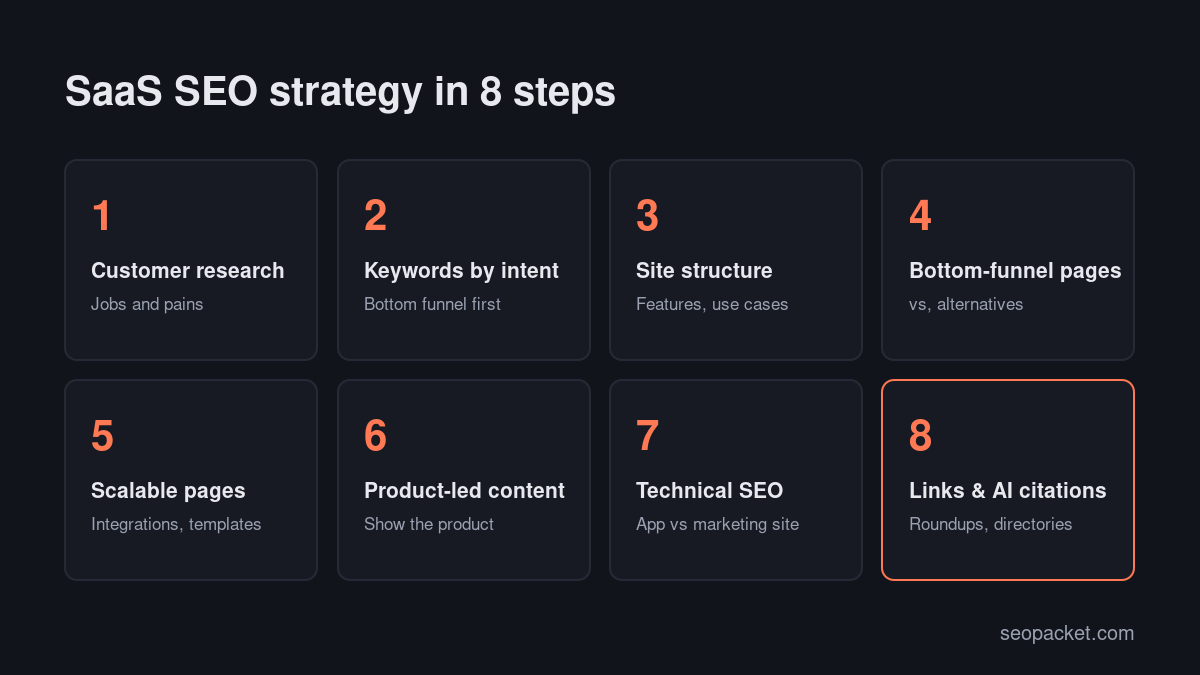
Step 1: Start with customer research
Before any keyword research, talk to customers or read what they write. Support tickets, sales calls, onboarding surveys, reviews and Reddit threads show the words people actually use to describe their problem.
Answer four questions:
- What job are customers hiring your product to do? For example, “find out why my new pages aren’t getting traffic”.
- What did they use before? Spreadsheets, a competitor, an agency, nothing at all?
- What almost stopped them buying? Price, setup time, missing integrations, trust?
- What did they search for when they started looking? Ask this directly in onboarding. It’s the single most useful input to a SaaS SEO strategy.
Step 2: Do keyword research by intent
Group keywords by how close they are to a buying decision, then map each group to a page type.
| Stage | Example searches | Page type |
|---|---|---|
| Ready to choose | “[competitor] alternative”, “[tool A] vs [tool B]”, “[category] pricing” | Comparison and alternatives pages, pricing page |
| Solution-aware | “[category] for [audience]”, “[task] tool”, “[tool] integration with [app]” | Use-case, feature and integration pages |
| Problem-aware | “why aren’t my pages indexed”, “how to track rankings” | Guides that lead naturally to the product |
| Curious | “what is [concept]”, industry trends | Explainers, glossary, research |
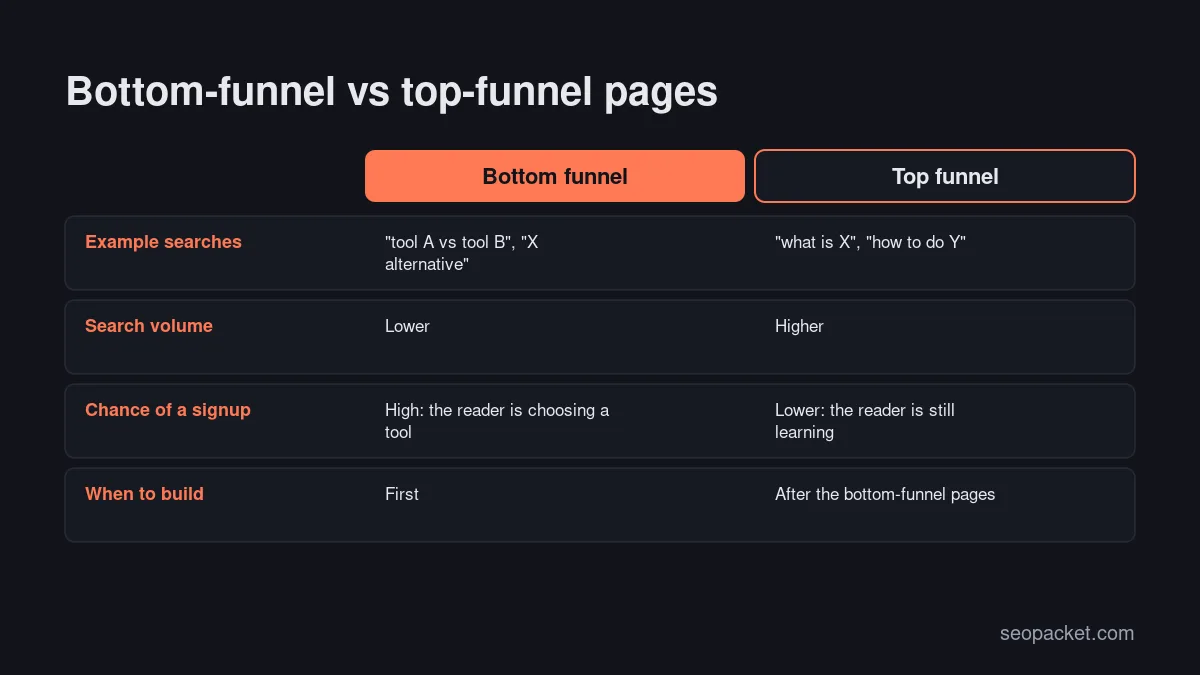
Early on, spend most of your effort on the top two rows. They have lower search volume, but a much higher share of visitors who sign up. As the site gains authority, move down the table toward broader educational content. An SEO competitor analysis is a useful companion here, because competitors’ top pages show which of these searches bring them customers.
Step 3: Build a site structure that matches how buyers search
A clear structure helps search engines understand your product and helps buyers find the page that answers their question. A typical SaaS marketing site includes:
- Home: your main category keyword and value proposition.
- Feature pages: one per major capability, each targeting how people search for that task.
- Use-case or solution pages: by audience (“for agencies”) or job (“for technical audits”).
- Integration pages: one per integration people search for.
- Comparison and alternatives pages: honest comparisons with named competitors.
- Pricing: indexable, clear and answering common billing questions.
- Docs and help centre: crawlable where it helps users searching for how-to answers.
- Blog or resources: guides that support the pages above.
Link these sections together. A use-case page should link to the features it relies on, and every guide should link to the feature that solves the problem it describes.
Step 4: Build bottom-funnel pages first
This is the step most SaaS companies skip, and it’s where a SaaS SEO strategy pays back fastest.
Alternatives and comparison pages
People searching “[competitor] alternative” or “[tool A] vs [tool B]” are close to a decision. Write fair, specific comparisons: what each tool does well, who each suits, pricing models and where you’re genuinely better. Don’t invent weaknesses. Readers check, and misleading comparisons damage trust. Keep claims accurate and dated, because competitors change their products too.
Use-case pages
Show exactly how your product solves one job for one audience, with screenshots, a short workflow and a clear next step. These pages often convert better than the homepage because they speak to a specific situation.
Pricing page
Make it indexable and answer the questions people search for: is there a free plan, how billing works, what happens when you go over a limit, how refunds work. SEOPacket’s pricing page explains its pay-as-you-go wallet and $1 signup credit in plain terms for exactly this reason.
Step 5: Scale with integration and template pages, carefully
Many SaaS companies grow search traffic with pages built from a template: one page per integration, per template, per location or per use case. This can work very well when each page is genuinely useful: specific setup steps, screenshots, real examples and details that differ from page to page.
It goes wrong when hundreds of pages differ only by a swapped word. Google’s spam policies describe scaled content made mainly to manipulate rankings as a violation. A good test: would you be happy for a customer to land on any one of those pages? If not, publish fewer, better pages.
Step 6: Make your content product-led
Product-led content teaches the reader how to solve their problem and shows your product doing it along the way. Instead of a generic “10 tips to improve SEO” post, you write “how to find pages Google hasn’t indexed”, with screenshots of the actual report.
Free tools are the strongest form of product-led content. A free checker, calculator or template attracts searches, links and signups. SEOPacket’s free site crawl and GEO readiness score work like this: people can see real results for their own site before paying for anything.
Step 7: Get technical SEO right for SaaS
SaaS sites have a few technical traps of their own:
- Keep the app out of the index. Logged-in areas such as
app.example.comshould be blocked from indexing with noindex or login walls, while signup and login pages stay reachable. - Don’t hide the marketing site behind JavaScript. Sites built as single-page apps need server-side rendering or pre-rendering so key content is in the HTML. Google’s JavaScript SEO basics explain why.
- Decide how docs fit in. Help articles that answer how-to searches can bring qualified visitors. Keep them crawlable, with clear titles, and link them to the relevant feature pages.
- Handle changelogs and old versions. Thin release-note pages and outdated docs can dilute quality. Consolidate or noindex what isn’t useful.
- Watch Core Web Vitals. Marketing sites weighed down with chat widgets, analytics and video can become slow. Audit third-party scripts regularly.
Our SEO checklist covers the full technical side.
Step 8: Earn links and AI citations
Links and mentions still separate sites that rank from those that don’t. For SaaS, the best sources are usually:
- Software directories and review sites such as G2, Capterra, Product Hunt and category-specific lists. They send traffic, build trust and are often cited by AI assistants.
- “Best [category] tools” roundups. Ask to be included where it’s a genuine fit, and offer a free account so the author can test your product.
- Integration partners. Partners often list integrations in their own directories.
- Original data. Anonymised insights from your product usage make strong linkable content.
- Communities. Helpful answers on Reddit, Indie Hackers or industry forums, with links only where they genuinely answer the question.
AI search matters for SaaS in particular, because buyers increasingly ask ChatGPT or Perplexity “what’s the best tool for X”. Those answers lean heavily on third-party roundups and review sites. Track which sources AI engines cite for your category, and work on being included there. Our guide to GEO vs SEO explains how AI engines choose sources.
Structured data for SaaS sites
Structured data helps search engines and AI assistants understand what your product is, who makes it and what it costs. Three types matter most for software companies:
- Organization sitewide, with your name, logo, URL and social profiles, so your brand is recognised as an entity.
- SoftwareApplication on the homepage or product pages, describing the application category, operating system and offers. Google documents the required and recommended properties in its software app structured data guide.
- FAQPage and BreadcrumbList where the page genuinely has visible FAQs and a hierarchy.
Only mark up what’s visible on the page. Ratings in particular must come from real reviews shown on the page, not from third-party sites or invented numbers.
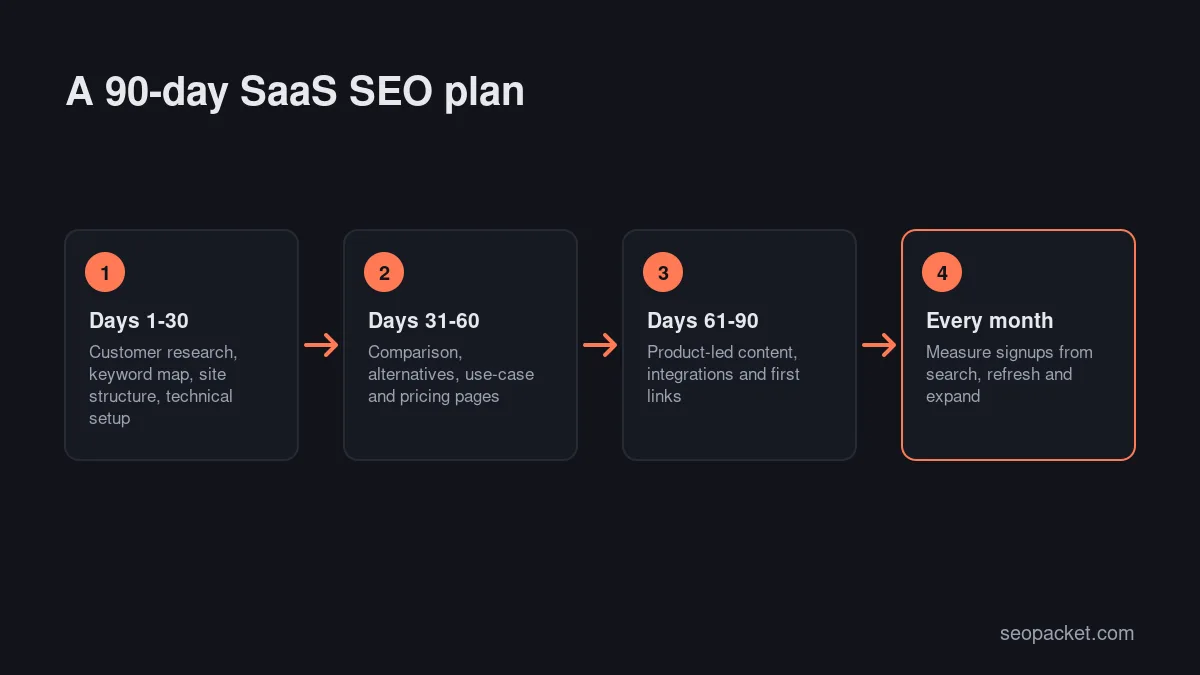
A 90-day SaaS SEO strategy for a new product
If you’re starting from zero, here’s how the eight steps fit into your first three months. It assumes one person spending a few days a week on SEO.
Days 1 to 30: foundations
Interview or survey ten customers, build your keyword map by intent, and fix the technical basics: indexable marketing site, noindexed app, sitemap submitted to Google and Bing, Organization and SoftwareApplication schema, and a fast homepage. Rewrite the homepage and pricing page around the words customers actually use.
Days 31 to 60: bottom-funnel pages
Publish your three to five most important comparison or alternatives pages, and two or three use-case pages for your best-fit audiences. Create profiles on the main software directories and ask a handful of happy customers for honest reviews there.
Days 61 to 90: product-led content and links
Publish two product-led guides a week that solve real problems with your product, and launch one free tool or template if you can. Reach out to the “best tools” roundups where you’re a genuine fit. At the end of the quarter, review signups by landing page and double down on the page types that convert.
After 90 days, the SaaS SEO strategy becomes a rhythm: new bottom-funnel pages as competitors and use cases change, a steady stream of guides, regular updates to your best pages and ongoing work on links and AI citations.
If you would rather hand part of this plan to specialists, our parent company, Soft Learn Hub, explains what to look for in a SaaS marketing agency beyond case studies.
SaaS SEO tools you actually need
You don’t need an enterprise stack to run a solid SaaS SEO strategy. These are the SaaS SEO tools that cover the essentials:
| Need | Tools | Cost |
|---|---|---|
| Indexing and search performance | Google Search Console, Bing Webmaster Tools | Free |
| Signups and conversions | Google Analytics 4 or a privacy-friendly alternative, plus product analytics | Free to paid |
| Site crawl and technical audit | SEOPacket site auditor, desktop crawlers | Free options |
| Keyword research and competitor gaps | SEOPacket, Semrush, Ahrefs, SE Ranking | Pay per check or subscription |
| Rank tracking | SEOPacket, dedicated rank trackers | Pay per check or subscription |
| AI search visibility | SEOPacket AI answer checks, dedicated GEO tools | Pay per check or subscription |
Early-stage SaaS teams often don’t need a monthly subscription to heavyweight SaaS SEO tools. SEOPacket charges per check from a prepaid wallet, so you pay for keyword research or rank checks when you need them. New accounts get a $1 credit to try the paid checks first.
SaaS SEO and content for different markets
If you sell internationally, decide early whether you need localised pages. Many SaaS products serve the US, UK, Canada, India, Pakistan and the UAE from one English site, which is fine: use consistent pricing in a clear currency, mention the markets you support, and make sure payment and tax questions are answered on the pricing page. Only create regional versions when the product, pricing or language genuinely differs, and then set up hreflang properly as described in Google’s guide to localized versions.
How to measure SaaS SEO
Traffic is a means, not the goal. Track these, monthly:
- Organic signups or trials, attributed to landing page, so you know which pages actually convert.
- Organic signup rate by page type: comparison, use case, integration, guide.
- Revenue or activated accounts from organic signups, if your product analytics can connect them.
- Impressions and clicks for your bottom-funnel pages in Search Console.
- AI visibility for a fixed list of buyer questions, checked monthly.
A guide with 10,000 visits and five signups may be worth less than a comparison page with 400 visits and 30 signups. Let the numbers decide where you invest next.
Common SaaS SEO mistakes
- Starting with top-of-funnel blog posts and wondering why traffic doesn’t convert.
- Only targeting your category keyword, which you probably can’t win yet.
- Unfair comparison pages that readers and competitors can easily disprove.
- Thin programmatic pages built for search engines rather than users.
- Letting the app or staging environment get indexed.
- Measuring rankings instead of signups.
A SaaS SEO strategy works when it’s patient and focused: a small number of excellent pages close to the buying decision, a site search engines can crawl easily, and steady work on the links and mentions that build trust.
Frequently asked questions
What is a SaaS SEO strategy?
A SaaS SEO strategy is a plan for earning organic search traffic that turns into trials and signups for a software product. It usually prioritises comparison, alternatives, use-case, integration and pricing pages, supported by product-led guides, solid technical SEO and links from directories and roundups.
How long does SEO take for a SaaS company?
Bottom-funnel pages on a site with some authority can bring signups within two to three months. Building meaningful organic growth for a new domain usually takes six to twelve months of consistent publishing and link building.
What are the best SaaS SEO tools?
Google Search Console and Bing Webmaster Tools are essential and free. Add a site crawler, a keyword and backlink tool, a rank tracker and an AI visibility checker. SEOPacket covers these with pay-per-check pricing, while Semrush, Ahrefs and SE Ranking offer subscriptions.
Should SaaS companies create comparison pages?
Yes, if they’re honest and specific. People searching for alternatives or “vs” comparisons are close to a decision, so fair comparison pages often convert better than any other content.
Should my SaaS app be indexed by Google?
The logged-in app shouldn’t be. Keep the marketing site, pricing, public docs and signup pages indexable, and keep account areas out of the index with login walls or noindex tags.

Leave a Reply