

- A local SEO audit checks everything that affects how a business appears in Google’s map results, local organic results and AI answers for searches near a place.
- Start with your Google Business Profile. Categories, contact details, hours and photos have a direct effect on local visibility.
- Consistent business name, address and phone number (NAP) across your site and directories, plus a steady flow of genuine reviews, build the trust local rankings depend on.
- Track rankings from the locations your customers search from. Local results change street by street, so a single national ranking tells you very little.
If you run a dental clinic, a restaurant, a law firm or a plumbing company, most of your search traffic comes from people nearby. They search “dentist near me” or “emergency plumber in Leeds”, look at the map, compare a few reviews and call. A local SEO audit tells you why your business does or doesn’t appear in those moments, and what to fix first.
This guide walks through a seven-step local SEO audit you can run yourself in an afternoon. It works for single-location businesses and for chains with several branches, and it covers Google as well as Bing, Apple Maps and AI assistants, which increasingly answer “who’s the best X near me” questions directly.
In this local SEO audit
What is a local SEO audit?
A local SEO audit is a review of everything that affects how a business appears in location-based search results. That includes your Google Business Profile, your listings on other directories, your reviews, the local content and structured data on your website, your site’s technical health, links from local sources and how you rank across your service area.
The output is a prioritised list of fixes. Some take minutes, such as correcting opening hours. Others, like earning reviews and local links, are ongoing work.
How local rankings work
Google says local results are based mainly on three factors: relevance, distance and prominence. Its help page on how to improve your local ranking on Google explains each one.
- Relevance: how well your profile and website match what the person searched for.
- Distance: how far your business is from the searcher, or from the location in their query.
- Prominence: how well known and trusted your business is, based on reviews, links, mentions and your website’s overall search strength.
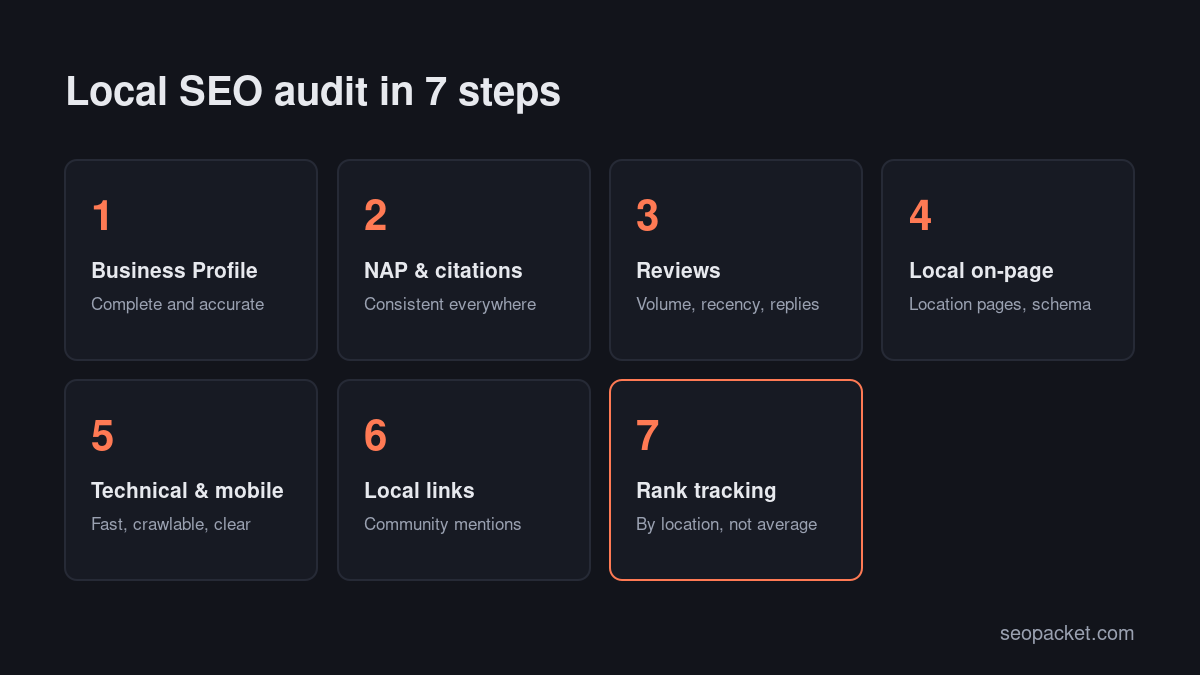
You can’t change distance, but the steps below improve relevance and prominence. The chart below shows the order we’d work in.
Step 1: Audit your Google Business Profile
Your Business Profile is the single most important asset in local search. Sign in and check each of these:
- Verification and ownership. Make sure the profile is verified and that you, not a former employee or agency, own it.
- Business name. Use your real-world business name exactly as it appears on your signage. Adding keywords or locations to the name breaks Google’s guidelines for representing your business and can get the profile suspended.
- Primary category. This has a big effect on which searches you appear for. Choose the most specific category that describes your main service, then add relevant secondary categories.
- Address or service area. Businesses that serve customers at their location show an address. Service-area businesses that visit customers should hide the address and set service areas instead.
- Phone number and website. Use a local number and link to the most relevant page, usually the homepage or the location page for that branch.
- Hours, including special hours. Wrong hours are one of the fastest ways to lose trust.
- Services, products and attributes. Fill these in completely. They help Google match you to specific searches.
- Photos. Add real photos of your premises, team and work. Replace stock images.
- Description. A plain, accurate summary of what you do and where, without keyword stuffing.
- Posts and Q&A. Occasional updates show the profile is active, and answering common questions helps customers decide.
Don’t forget the other platforms. Claim and complete your listings on Bing Places and Apple Business Connect too. Bing’s data feeds Microsoft Copilot and other services, and Apple Maps is the default on iPhones.
Step 2: Check NAP consistency and citations
NAP stands for name, address and phone number. Search engines compare your details across the web; when they match, they’re more confident about your business.
To audit citations:
- Write down your canonical NAP, exactly as it appears on your Business Profile, including formatting such as “Street” or “St”.
- Search for your business name and phone number and list every directory, social profile and map listing that mentions you.
- Fix inconsistencies: old addresses, old phone numbers, previous business names and duplicate listings.
- Fill gaps on the directories that matter in your country and industry, such as major general directories, industry associations and your chamber of commerce.
Quality beats quantity. A handful of accurate, relevant listings is worth more than hundreds of low-quality directory submissions.
Step 3: Review your reviews
Reviews are one of the strongest prominence signals, and they’re what most people read before calling. Audit:
- Volume and recency. How many reviews do you have compared with the businesses that outrank you, and how many came in the last three months?
- Average rating. A small gap in rating matters less than a big gap in recent reviews.
- Responses. Reply to every review, positive and negative, politely and specifically. Future customers read the replies.
- Keywords in reviews. Customers often mention the service and the area naturally. You can’t script this, but you can ask customers to mention what you did for them.
Build a simple habit of asking every happy customer for a review, with a direct link. Never buy reviews, offer rewards for positive ones, or only ask customers you expect to be happy. Google’s policies prohibit fake engagement and review gating, and suspended reviews or profiles are hard to recover.
Step 4: Audit your local on-page SEO
Your website supports your Business Profile. Check:
- Location pages. If you have several branches, give each one its own page with the full address, phone, opening hours, embedded map, directions, photos and details specific to that branch. If you serve several towns from one location, create pages only where you have something genuinely specific to say.
- Title tags and headings. Include the service and location where they fit naturally, for example “Emergency plumber in Leeds | Brand”.
- NAP on the site. Your name, address and phone number should match your Business Profile exactly, usually in the footer and on the contact page.
- LocalBusiness schema. Mark up each location with the most specific LocalBusiness subtype, including address, geo coordinates, opening hours, phone and URL. Validate it with Google’s Rich Results Test. Soft Learn Hub, the company behind SEOPacket, has a LocalBusiness schema guide with a free generator.
- Local content. Case studies from local customers, guides to local regulations and pages about the areas you serve all build relevance.
- Click to call and directions. Make it one tap from the page to call or navigate.
Our SEO checklist covers the general on-page checks that apply to every page as well.
Step 5: Run technical and mobile checks
Most local searches happen on phones, often on the move. Check:
- Mobile speed. Run your homepage and main location page through PageSpeed Insights and check Core Web Vitals in Search Console.
- Indexing. Make sure location pages are indexed. Our guide to getting pages indexed by Google explains how to check and fix it.
- Duplicate location pages. Near-identical pages for different towns can be filtered out or treated as low quality.
- HTTPS and broken links. Especially on booking and contact pages.
- Forms and booking. Test that contact forms and booking widgets actually work on mobile.
A local SEO audit tool that crawls your site, such as SEOPacket’s free site auditor, catches most of these technical problems in one pass. If your site runs on WordPress, our guide to Core Web Vitals on WordPress covers the most effective speed fixes.
Step 6: Audit local links and mentions
Links and mentions from local sources show search engines you’re a real, active part of the community. Look for:
- Local news coverage of your business, events or expertise.
- Sponsorships and partnerships with local clubs, charities and events that list their sponsors.
- Industry associations and professional bodies with member directories.
- Suppliers and partners who can list you as a stockist, installer or partner.
- Local guides and “best of” lists written by local publications or bloggers.
Compare your local links with the businesses that outrank you. Where they have mentions you don’t, find out how they earned them.
Local SEO beyond Google
Google dominates local search in most markets, but it isn’t the whole picture. Apple Maps is the default map on every iPhone, and Apple Business Connect lets you control your name, hours, photos and actions there. Bing Places feeds Bing Maps and Microsoft’s assistants, and it can import your details straight from your Google profile in a few minutes. In some markets, local directories, delivery apps and booking platforms matter as much as maps, so check where your customers actually find businesses like yours and make sure your details are accurate there too.
Step 7: Track local rankings and AI answers
Local rankings vary a lot with the searcher’s location. You might be first in the map pack when someone searches from your street and invisible two miles away. A useful review measures rankings from several points across your service area, not from one place.
Track:
- Map pack and organic positions for your main service keywords, from several locations across your service area.
- Business Profile performance: searches, views, calls, website clicks and direction requests.
- AI answers. Ask ChatGPT, Perplexity and Google’s AI features questions like “best dentist in [town]” and note which businesses and sources they mention. They often draw on review sites, directories and local articles.
SEOPacket’s rank tracker checks rankings for a specific location, and its AI answer checks show which businesses AI engines recommend for your prompts. Both run from a prepaid wallet with no subscription, and new accounts get a $1 credit to test them.
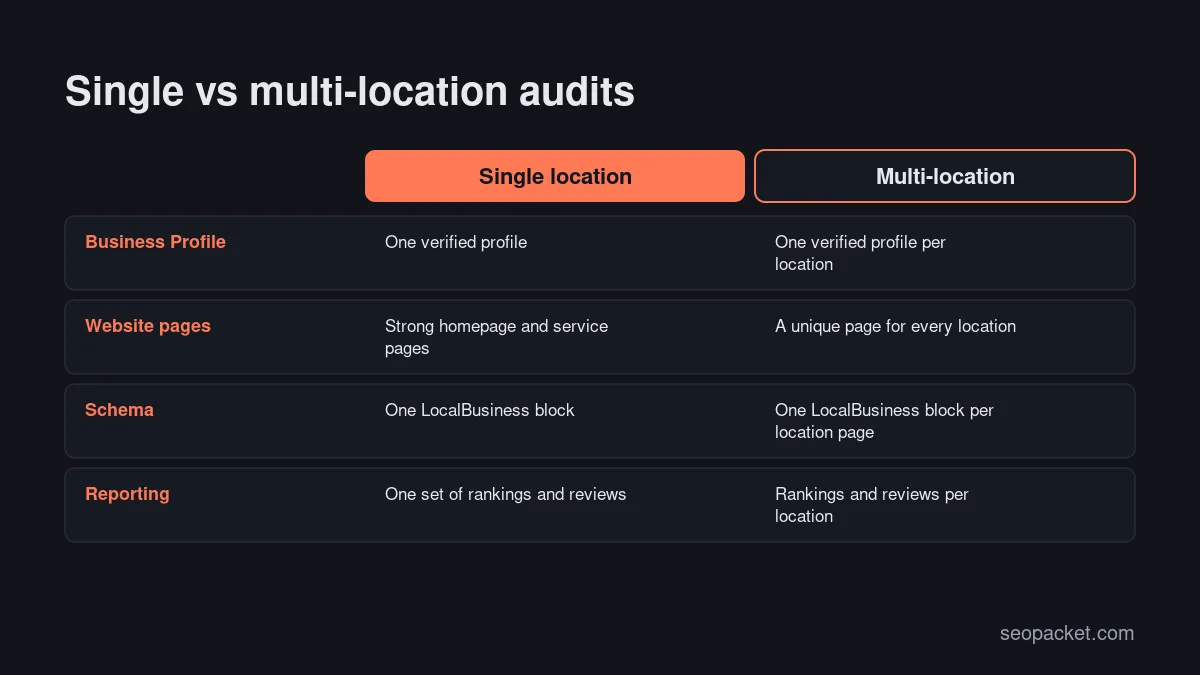
Multi-location businesses
Chains and franchises need the same checks, repeated for every branch, plus a few extra ones:
- One Business Profile per real location. Each branch that serves customers in person gets its own verified profile. Don’t create profiles for virtual offices or addresses where you don’t have staff.
- One page per location, linked from a store locator or locations hub, each with unique content: the branch team, parking and access details, local services, photos and reviews for that branch.
- Consistent naming. Use the same brand name across every branch, adding the location only where it’s genuinely part of the name customers see.
- Central review process. Give each branch its own review link and track review volume by branch, so weaker locations get attention.
- Bulk management. Once you pass ten or so locations, use Business Profile’s bulk tools or a listing management service to keep hours and details accurate.
Service-area businesses
Plumbers, cleaners, electricians and mobile services often don’t have a public address. In that case, hide your address in the Business Profile, set realistic service areas, and focus your website on the towns and districts you genuinely cover. A service-area business can still rank well in the map pack for nearby searches, but expect visibility to fade with distance from your verified location. Case studies from jobs in specific areas are a natural, useful way to show you work there.
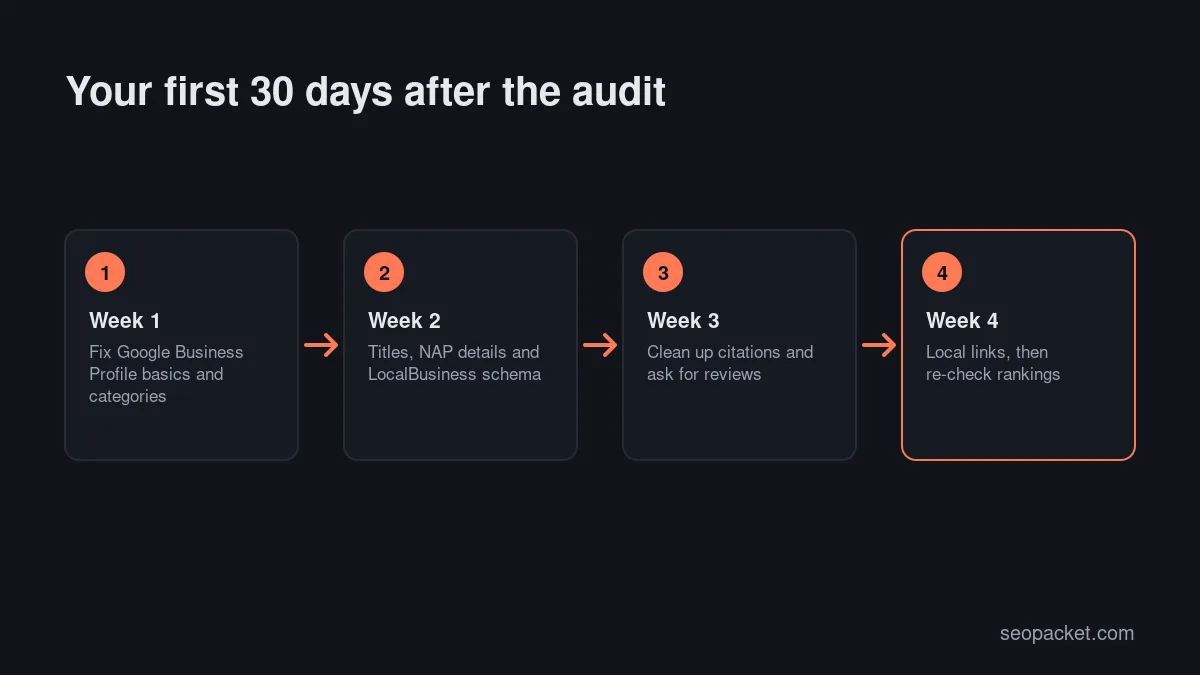
What to do in the 30 days after your audit
- Week 1: fix everything in your Business Profile, remove duplicate listings and correct the top ten citations.
- Week 2: update title tags and contact details on your location pages, and add LocalBusiness schema.
- Week 3: start a simple review request routine, with a link in receipts, follow-up emails or at the end of each job.
- Week 4: reach out to two or three local partners or associations about listings or mentions, and set up location-based rank tracking so you can measure progress.
Local SEO checklist summary
| Area | What to check | Priority |
|---|---|---|
| Business Profile | Verification, name, categories, hours, services, photos | Highest |
| NAP and citations | Consistent details, duplicates removed, key directories | High |
| Reviews | Volume, recency, replies, a steady request process | High |
| Local on-page | Location pages, titles, NAP, LocalBusiness schema | High |
| Technical and mobile | Speed, indexing, working forms, HTTPS | Medium |
| Local links | News, sponsorships, associations, partners | Medium |
| Tracking | Rankings by location, profile insights, AI answers | Ongoing |
Use this table as a quick local SEO checklist after the first full audit.
Choosing a local SEO audit tool
You can run most of these checks manually, but a few tools save a lot of time:
- Google Business Profile and Search Console, both free, for profile performance and website search data.
- A site crawler for technical checks across location pages.
- A local rank tracker that can check rankings from specific locations, not just a country.
- A citation tool if you have many locations and need to manage listings at scale.
- An AI visibility checker to see which local businesses AI assistants recommend.
Pick a local SEO audit tool based on how many locations you manage. A single-location business rarely needs an expensive subscription; a chain with dozens of branches usually does.
How often should you run a local SEO audit?
Run a full local SEO audit once a year, and whenever something changes: a new location, a move, a rebrand, new services or a sudden drop in calls. In between, check your Business Profile monthly for unwanted edits (anyone can suggest changes), reply to reviews weekly and track rankings monthly.
Common local SEO mistakes
- Keyword-stuffed business names that break Google’s guidelines.
- Wrong primary category, which hides you from your most important searches.
- Duplicate listings from old addresses or previous agencies.
- Thin, copy-paste location pages with only the town name changed.
- Asking only happy customers for reviews, or offering incentives for them.
- Ignoring Bing and Apple Maps, which matter more than many businesses assume.
- Measuring rankings from one location and assuming the whole city sees the same thing.
Frequently asked questions
What is a local SEO audit?
A local SEO audit is a review of everything that affects how a business appears in local search results and maps, including its Google Business Profile, directory citations, reviews, location pages and schema, technical health, local links and rankings across its service area.
How long does a local SEO audit take?
For a single-location business, a thorough local SEO audit takes a few hours. Businesses with many locations can take several days, mostly checking profiles, citations and location pages branch by branch.
What is the most important local ranking factor I can control?
A complete, accurate Google Business Profile with the right primary category, supported by a steady flow of genuine reviews and a website with consistent contact details and relevant local content.
Do I need a local SEO audit tool?
Not for a single location, where free tools and manual checks cover most of the audit. A local rank tracker that checks specific locations is the most useful paid addition, and citation management tools help businesses with many branches.
Does local SEO affect AI search results?
Yes. When people ask AI assistants for local recommendations, the answers draw on business listings, reviews, directories and local articles. The same work that improves local SEO makes your business more likely to be mentioned.

Leave a Reply