

- The best AI search engine depends on the job: Perplexity for source-heavy research, Google AI Mode for deep questions on Google’s index, ChatGPT search for follow-ups in a chat, and Copilot or Brave Search for free answers built on Bing or an independent index.
- Most AI search engines cite sources, but how clearly they do it varies. Open the cited page before you rely on any answer.
- Every major option has a free way in at the time of writing. Paid plans mostly buy more usage, stronger models and longer research tasks.
- For site owners, getting cited starts with classic SEO: be indexed in Google and Bing, let the search crawlers in, and answer questions directly on the page.
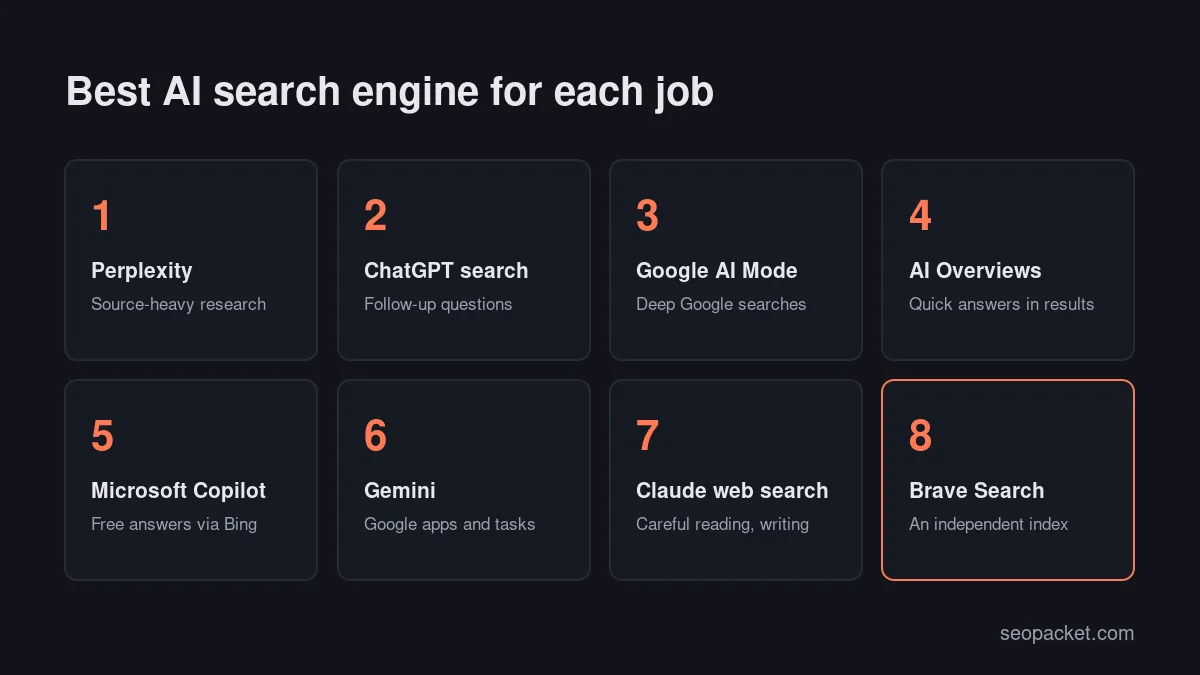
The best AI search engine for most people is the one that fits the task: Perplexity for research where you want every claim sourced, Google AI Mode for deeper questions on top of Google’s index, ChatGPT search for follow-up questions inside a chat, and Microsoft Copilot or Brave Search when you want free answers built on Bing or an independent index. No single tool wins every job.
This guide compares eight options by what each is best for, whether answers cite sources, where the results come from and what you can use for free. It ends with a section for site owners on how AI search engines find and cite pages, and what that means for your own content.
In this AI search engine guide
What is an AI search engine?
An AI search engine answers your question in plain language instead of only listing links. It retrieves pages from a search index, uses a language model to summarise them, and usually links the pages it used. You can ask follow-up questions, and the engine keeps the context of the conversation.
Definition: An AI search engine is a search tool that writes an answer to your question by retrieving web pages and summarising them with a language model, normally with citations that link back to its sources.
Under the hood, every AI search engine has three parts: an index of web pages (its own, or results from Bing or Google), a language model that reads and writes, and a citation layer that shows where each statement came from. The differences between products mostly come down to which index they use and how carefully they show their sources.
How is an AI search engine different from classic search?
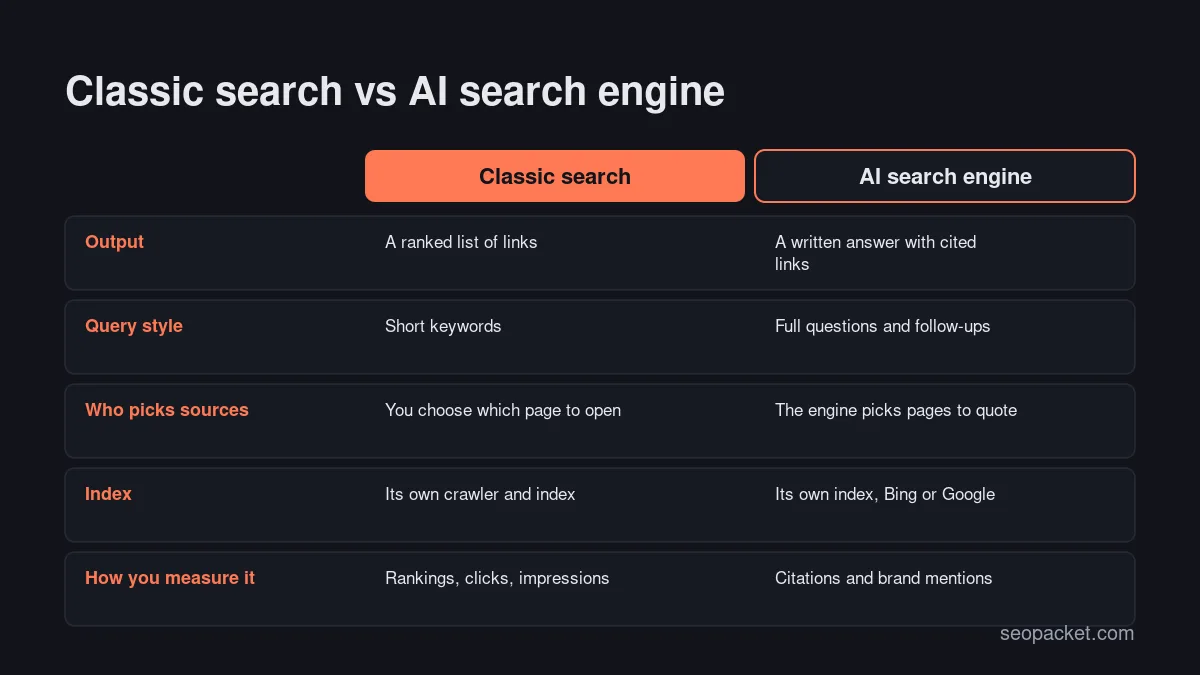
A classic search engine gives you a ranked list of links and leaves the reading to you. An AI search engine does the first round of reading for you and returns a written answer with a handful of cited pages. That saves time on simple questions but makes it easier to accept a wrong summary without checking.
The query style changes too. People type short keywords into Google, but they ask AI search engines full questions with context, such as “which project management tool suits a five-person agency with a small budget”. Our guide to GEO vs SEO covers how this shift changes the way content gets found.
How do AI search engines work?
Most AI search engines follow the same loop. They rewrite your question into one or more search queries, fetch the top results from an index, pass the most relevant passages to a language model, and ask it to write an answer that cites those passages. Some run many searches at once for a single question.
Google describes this openly for AI Mode: it splits a question into subtopics and searches for each one at the same time, then combines what it finds. OpenAI’s help page on searching the web with ChatGPT explains that ChatGPT rewrites your prompt into targeted queries and sometimes sends them to third-party search providers.
This design has one practical consequence: the answer can only be as good as the pages retrieved. If the index is thin on your topic, or the model misreads a page, you get a confident answer that is wrong. Both Google and OpenAI warn that AI answers and citations can be wrong, so clicking through to the cited source is part of using these tools well.
The best AI search engines compared
Here is a side-by-side view of the main AI search engines at the time of writing. Features and plans change often, so check each official page before you choose.
| AI search engine | Best for | Cites sources? | Where results come from | Free access |
|---|---|---|---|---|
| Perplexity | Source-heavy research | Yes, numbered citations | Its own crawler, PerplexityBot | Free plan, paid tiers |
| ChatGPT search | Follow-ups inside a chat | Yes, citations and a Sources panel | OpenAI search plus third-party providers | Free, even signed out |
| Google AI Mode | Deep questions on Google | Yes, links in the answer | Google Search index | Free where available |
| Google AI Overviews | Quick answers in normal results | Yes, linked sources | Google Search index | Free, shown automatically |
| Microsoft Copilot | Free answers built on Bing | Yes, source links | Bing | Free |
| Gemini | Work inside Google apps | When it uses the web | Google Search index for grounding | Free tier, Google AI plans |
| Claude with web search | Careful reading and writing | Yes, on every search answer | Claude’s web search tool | Free tier, paid plans |
| Brave Search | Private search, own index | Yes, linked sources | Brave’s independent index | Free |
Which is the best AI search engine for each job?
The honest answer to “what is the best AI search engine” is a list of good fits, not a winner. Here is what each option does well and where it falls short.
Perplexity: best for source-heavy research
Perplexity was built as an AI search engine from the start, and citations are central to how it works: answers show numbered references you can open one by one. It suits research questions where you want to see exactly which page supports each sentence, such as comparing software, checking a regulation or summarising recent news.
Perplexity runs its own crawler, PerplexityBot, to find and link pages in its results. It has a free plan and paid tiers at the time of writing. Its weakness is the same as every AI search engine: the summary can blend sources, so open the citations for anything important.
ChatGPT search: best for follow-up questions in a chat
If you already use ChatGPT, its built-in search is the easiest way to get current information without leaving the conversation. At the time of writing, OpenAI says web search is available on every ChatGPT plan, including Free, and to people who are not signed in. Answers include citations, and a Sources panel lists the pages used.
ChatGPT search shines when the question needs a back-and-forth: you ask, refine, then ask it to turn the findings into a table or an email. OpenAI’s own crawler for search is OAI-SearchBot, and the help page names Microsoft among the third-party search partners involved.
Google AI Mode: best for deep questions on Google
AI Mode is Google’s conversational search tab. It uses Google’s own index and is free in the countries and languages listed on Google’s help page. It is designed for long, multi-part questions, which it splits into subtopics before searching.
Choose AI Mode when you trust Google’s results but want a written summary and follow-ups instead of ten tabs. Its answers include links to the pages it drew on, so you can still go to the source.
Google AI Overviews: best for quick answers in normal results
AI Overviews are the short AI summaries that appear at the top of some ordinary Google results. You do not choose them; Google shows them when it decides a summary helps. They suit quick factual questions where a two-paragraph answer is enough.
They are a feature rather than a separate AI search engine, but they matter because so many people see them. Google’s help page says they cannot be switched off, although the Web filter shows text links without them.
Microsoft Copilot: best for free answers built on Bing
Microsoft Copilot answers questions with web results from Bing and links the sources it used. It is free to use at the time of writing and works in the browser, on Windows and on mobile. It is a sensible default AI search engine if you prefer Bing’s results or already work in Microsoft’s apps.
For site owners, Copilot is notable because Microsoft reports on it: Bing Webmaster Tools added an AI Performance report that shows how often your pages are cited in Copilot and in Bing’s AI summaries.
Gemini: best for work inside Google apps
Gemini is Google’s assistant rather than an AI search engine first, but it can ground its answers in Google Search and shows a Sources button when it uses web pages. It is most useful when search is one step in a bigger task, such as planning a trip or drafting a document, and you want web facts mixed in.
Gemini has a free tier, and Google’s paid AI plans add stronger models and higher limits at the time of writing. For pure web research, AI Mode is usually the more direct choice.
Claude with web search: best for careful reading and writing
Claude can search the web on every plan at the time of writing, including Free, and Anthropic says every response that uses search includes citations. It is a good fit when you want to read several sources and then produce something careful from them, such as a summary, a brief or an edited draft.
Anthropic’s crawler for search is Claude-SearchBot, and Claude-User fetches pages when a person’s question needs them. Claude is a strong research partner but a less natural place to start a quick everyday search.
Brave Search: best for private search on an independent index
Brave Search runs on its own independent index rather than renting results from Google or Bing, and it adds AI answers with linked sources on top of its normal results. That makes it one of the few AI search engines with a genuinely different view of the web.
Choose Brave if privacy matters to you or you want a second opinion outside the Google and Bing ecosystems. At the time of writing, its AI answers can be switched off in Brave Search’s settings if you prefer plain results.
What about You.com?
You.com was one of the first AI search engines aimed at consumers. At the time of writing, its homepage presents it mainly as a set of web search APIs for AI agents and developers, so it is a better fit for teams building products than for everyday searching.
Do AI search engines cite their sources?
Yes, all the options above show sources when they use the web, but in different ways. Perplexity and Claude cite inline, ChatGPT search adds citations plus a Sources panel, Google links pages inside and below the answer, and Gemini shows sources only when a response draws on web pages.
A citation is not proof. The engine may cite a page that only partly supports the sentence, or summarise an outdated version. OpenAI’s help page makes the same point and suggests checking when the source was published. A simple habit helps: for anything you will repeat to a client or publish, open at least two of the cited pages.
Quick answer: If visible, checkable sources matter most to you, start with Perplexity or Claude with web search. If you want Google’s index, use Google AI Mode. If you want a free tool built on Bing, use Copilot.
Are AI search engines free?
Every option in this guide has a free way in at the time of writing. Paid plans mostly buy more usage, access to stronger models and longer research tasks rather than better sources.
- Free: all eight options have a free way in, with usage limits on the chat-style tools.
- No sign-in needed: ChatGPT search (according to OpenAI’s help page), Google AI Overviews and Brave Search.
- Paid upgrades: Perplexity’s paid tiers, ChatGPT Plus and Pro, Google’s AI plans for Gemini, and Claude Pro and Max.
If you are choosing a paid AI search engine plan, try the free tier on your real questions for a week first. Our parent company, Soft Learn Hub, also keeps a wider guide to free and paid AI tools if you need writing or image tools as well.
How do AI search engines choose which pages to cite?
AI search engines can only cite pages they can find and read. Most rely on a major index (Google or Bing) or their own crawler, then pick passages that answer the question clearly. Pages that are indexed, crawlable by the right bots and written with direct answers have the best chance of being quoted.
Here is where each engine looks:
| AI search engine | Index or crawler to allow | What controls it |
|---|---|---|
| Google AI Overviews, AI Mode | Googlebot and the Google Search index | Normal Search rules, snippet controls |
| Gemini | Google Search index for grounding | Google-Extended token |
| Microsoft Copilot | Bingbot and the Bing index | robots.txt, Bing Webmaster Tools |
| ChatGPT search | OAI-SearchBot, plus search partners | robots.txt |
| Perplexity | PerplexityBot | robots.txt |
| Claude | Claude-SearchBot and Claude-User | robots.txt |
Google states in its guide to AI features and your website that there are no extra requirements for AI Overviews or AI Mode: a page must be indexed and eligible to show with a snippet, and normal SEO best practice applies. OpenAI’s crawler documentation says sites that block OAI-SearchBot will not be shown in ChatGPT search answers, though they can still appear as navigational links.
Training crawlers are a separate decision. GPTBot, ClaudeBot and the Google-Extended token control whether content is used to train models, and blocking them does not remove you from search answers. Decide on each group on purpose rather than blocking every AI bot by default.
Watch out: Some security plugins and CDN bot rules block unfamiliar crawlers automatically. If you want to be cited, check that the search bots above are not being served 403 errors.
How to get your site cited by AI search engines
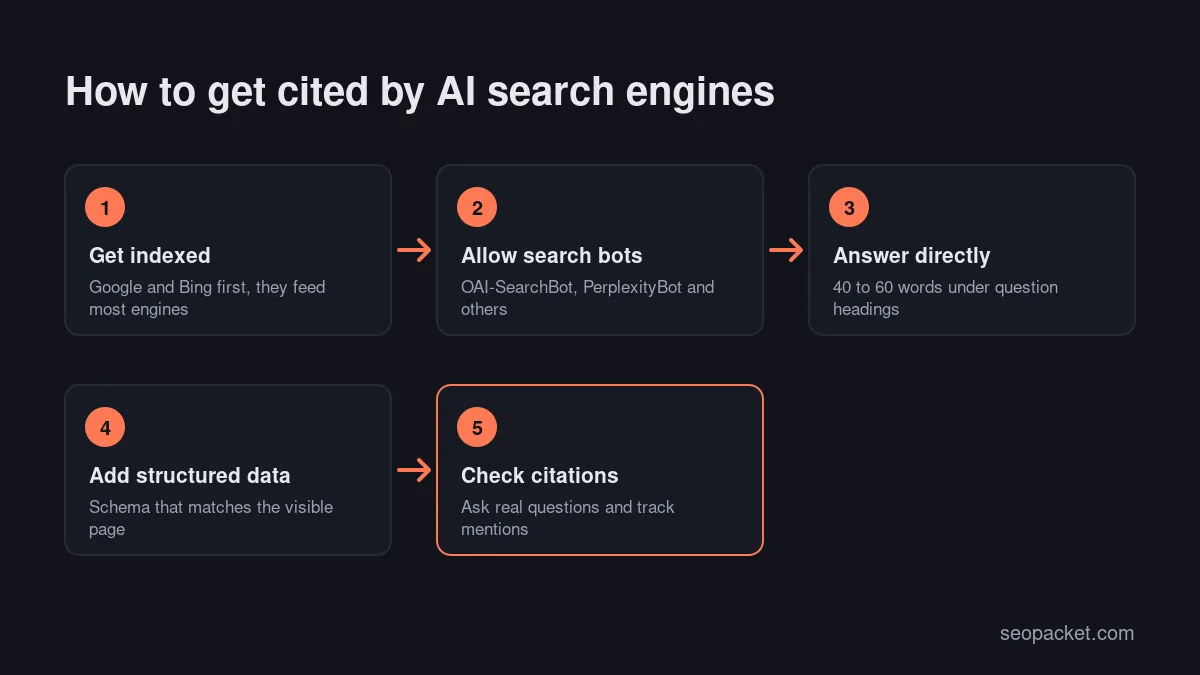
Getting cited is mostly good SEO done carefully. These six steps cover the basics for any AI search engine.
- Get indexed in Google and Bing. Google’s AI features and Microsoft Copilot draw on these two indexes. Our guide to getting indexed by Google covers the Google side; add your site to Bing Webmaster Tools as well.
- Allow the search crawlers. Check robots.txt and firewall rules for Googlebot, Bingbot, OAI-SearchBot, PerplexityBot and Claude-SearchBot. Our technical SEO checklist covers crawl access in detail.
- Answer the question directly. Put a 40 to 60 word answer straight under a question-style heading, then add detail. Engines quote clear, self-contained passages.
- Add structured data that matches the page. Organization, Article, Product or LocalBusiness schema helps engines understand who you are and what the page covers.
- Show evidence. Name sources, add dates and keep facts current. Clear sourcing builds reader trust and makes a passage easier to quote accurately.
- Check whether you are cited. Ask the questions your customers ask and see which pages appear. Use Bing’s AI Performance report for Copilot.
SEOPacket’s free AI-search readiness score checks several of these points on a page, including crawler access, structured data, question headings, direct answers and llms.txt. Its paid AI answer checks ask Perplexity a real customer question and show whether your brand is mentioned or linked. For a wider view of tools in this space, see our comparison of GEO tools.
Mistakes to avoid with AI search engines
- Treating the answer as the source. Quote the page the engine cited, not the AI summary.
- Asking keyword-style questions. Full questions with context get far better answers than two-word queries.
- Using one engine for everything. A quick cross-check in a second AI search engine catches many errors.
- Blocking every AI bot by default. If you run a website, separate search crawlers from training crawlers before you write robots.txt rules.
- Ignoring Bing. Copilot and several other tools depend on it, and setting up Bing Webmaster Tools takes minutes.
Picking the best AI search engine is less about a ranking and more about matching the tool to the question. Use one for research, one for everyday answers, and check the sources whenever the answer matters. The SEOPacket docs explain how to run the readiness checks on your own pages.
Frequently asked questions
What is the best AI search engine right now?
It depends on the task. Perplexity suits source-heavy research, Google AI Mode suits deep questions on Google’s index, ChatGPT search suits follow-up questions in a chat, and Copilot or Brave Search suit free answers built on Bing or an independent index.
Are AI search engines free to use?
Yes, every major option has a free way in at the time of writing. ChatGPT search even works without signing in. Paid plans add more usage, stronger models and longer research tasks.
Which AI search engine shows its sources most clearly?
Perplexity and Claude with web search cite inline, and ChatGPT search adds a Sources panel. Google AI Mode and Copilot also link their sources. Always open the cited page before you rely on an answer.
Is an AI search engine more accurate than Google?
Not necessarily. An AI search engine summarises pages it retrieves, so it can misread or blend sources. Classic results let you judge each page yourself, which is safer for important decisions.
How do I get my website cited by AI search engines?
Make sure your pages are indexed in Google and Bing, allow search crawlers such as OAI-SearchBot, PerplexityBot and Claude-SearchBot, answer questions directly under clear headings, and add structured data that matches the page.
Does blocking GPTBot remove my site from ChatGPT search?
No. GPTBot controls model training, while OAI-SearchBot controls whether pages can appear in ChatGPT search answers. You can block one and allow the other.

Leave a Reply