


- SEO silos group related pages into clear sections, each with a hub page and supporting pages, linked together so search engines understand what each section covers.
- The useful part of siloing is a clear hierarchy and deliberate internal linking. The outdated part is refusing to link between sections when readers would benefit.
- A good SEO silo structure starts with keyword research and clustering, not with categories you invent.
- On WordPress, categories, parent pages, breadcrumbs and a hub page per topic give you most of the benefit without special plugins.
Imagine a library that shelved books in the order they arrived. Every book would still be there, but finding anything would be painful, and nobody could tell what the library specialised in. Many websites work like that: years of posts in one long list, linked at random. SEO silos are a way of organising a site into clear sections so both readers and search engines can see what you cover and how it fits together.
This guide explains what SEO silos are, whether siloing SEO still makes sense in 2026, how silos compare with topic clusters, and six practical steps to build a silo structure on any site, including WordPress.
In this SEO silos guide
What are SEO silos?
SEO silos are groups of closely related pages organised under a single topic, usually with one hub page at the top and supporting pages below it. Pages within a silo link to each other and to the hub, and the hub links down to each supporting page. The structure is often reflected in the URLs, the navigation and the breadcrumbs.
For example, a site about home fitness might have three silos: strength training, cardio and nutrition. The strength silo has a hub page (“Strength training at home”) and supporting pages on dumbbells, bodyweight workouts and programmes. Each supporting page links back to the hub and to its closest siblings.
Physical vs virtual silos
There are two ways to build an SEO silo structure, and most sites use both.
- Physical silos use the URL structure and folders:
/strength/dumbbell-workouts/,/strength/bodyweight/. The hierarchy is visible in every URL. - Virtual silos use internal links rather than folders. Pages might live at
/dumbbell-workouts/, but links, navigation and breadcrumbs connect them to the strength hub.
Physical silos make the structure obvious, but they’re harder to change later, because moving a page means changing its URL and adding redirects. Virtual silos are more flexible. What matters to search engines is less the folder and more the pattern of links and the clarity of the hierarchy.
Do SEO silos still work?
Yes and no. The idea behind SEO silos, a clear hierarchy with related pages linked together, is as sound as ever. Google finds pages through links and uses them to understand context; its documentation on making links crawlable notes that anchor text helps it understand what the linked page is about.
What doesn’t hold up is the strict version of siloing SEO that some guides still teach: never linking between silos, to keep “link juice” contained. Readers don’t think in silos. If a post about dumbbell workouts mentions protein intake, a link to your nutrition guide helps the reader, and it doesn’t damage your structure. Link across silos when it genuinely helps, and keep the majority of links within the silo.
SEO silos vs topic clusters
Topic clusters, also called hub-and-spoke models, are essentially a modern name for virtual silos. A pillar page covers a broad topic, cluster pages cover subtopics in depth, and all of them link to the pillar.
| Structure | Hierarchical sections, often reflected in URLs | A pillar page with linked cluster pages |
|---|---|---|
| Internal links | Mostly within the silo, traditionally none across silos | Pillar and clusters interlinked, cross-links allowed |
| URLs | Often folder-based | Usually flexible |
| Best for | Large sites with clearly separate sections | Blogs and content hubs built around themes |
In practice, the best approach mixes both: clear top-level sections (silos), each built as a pillar-and-cluster hub, with sensible cross-links where readers need them. On this site, our SEO checklist acts as a pillar for SEO topics, with more detailed guides linking back to it.
Why a clear site structure helps SEO
A good SEO silo structure helps in four ways:
- Crawling. Pages linked from a hub are found and recrawled more reliably than pages buried in date archives.
- Relevance. A group of well-linked pages on one topic sends a stronger signal about your expertise than scattered posts.
- Authority flow. Links earned by the hub page pass value down to supporting pages through internal links, and the reverse.
- User experience. Readers find related content easily, stay longer and understand what else you offer.
It also helps with AI search. AI engines looking for a trustworthy source on a subject are more likely to find, understand and cite a site that covers the subject thoroughly and coherently. Our guide to GEO vs SEO explains how AI engines choose sources.
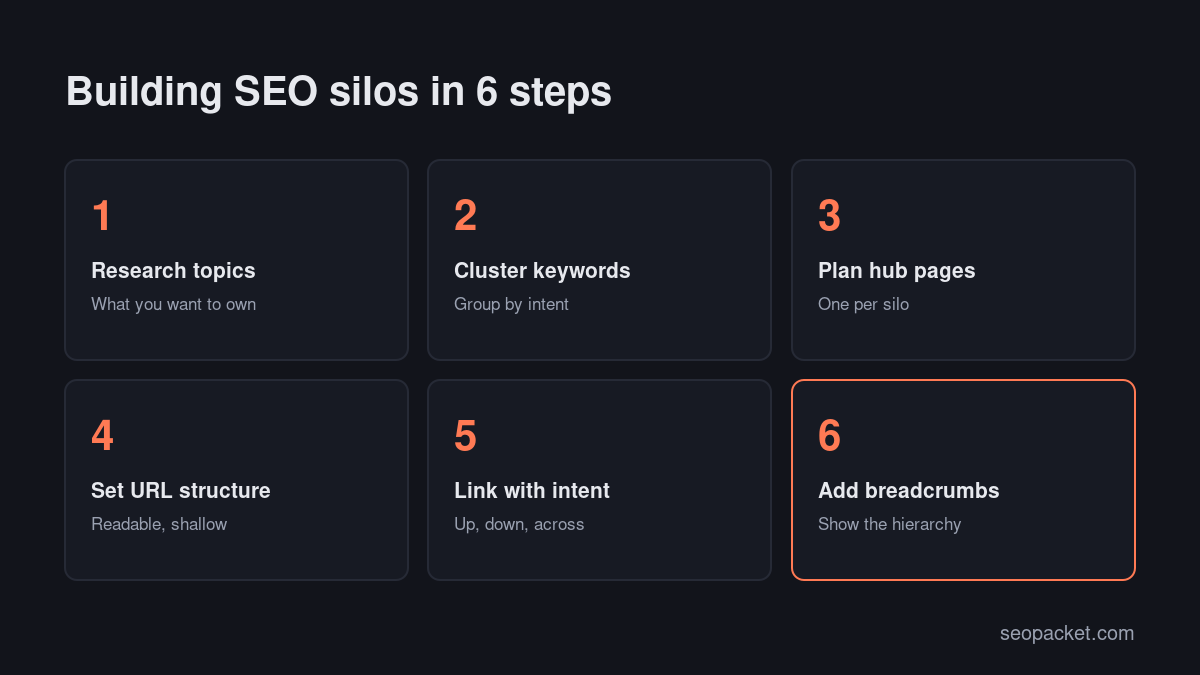
Step 1: Research the topics you want to own
Start with your business, not with keywords. List the three to seven broad topics that matter most to your customers and your offer. These become your candidate silos. For a project management tool, they might be planning, team collaboration, time tracking and reporting.
Then check demand. For each topic, look at the searches people make, the questions in “People also ask” and the pages that currently rank. Drop topics with no real search interest or no connection to what you sell.
Step 2: Cluster your keywords
Group keywords by the intent behind them, not just by shared words. Two keywords belong on the same page if the same result would satisfy both; they belong on different pages if Google shows different results for them.
A simple method: search both keywords and compare the top ten results. If several URLs appear in both, target them with one page. If the results are different, they need separate pages. Keyword clustering tools automate this comparison at scale.
Each cluster becomes one page, and each group of related clusters becomes a silo.
Step 3: Plan a hub page for each silo
The hub page introduces the topic, answers the broad question and links to every supporting page in the silo with a short description. It’s usually the page that targets the broadest keyword in the silo.
A strong hub page:
- Answers the main question in the first paragraph.
- Summarises each subtopic in a few sentences and links to the detailed page.
- Is updated whenever a new supporting page is added.
- Earns links in its own right, because it’s the most complete overview of the topic on your site.
Don’t make hub pages thin link lists. A category archive with nothing but post titles is a weak hub; a written guide that introduces each subtopic is a strong one.
Step 4: Set a clear URL structure
Decide whether your silos will be physical, virtual or both. For new sites, short, readable URLs with one folder level often work well: /strength/, /strength/dumbbell-workouts/. Google’s guidance on URL structure recommends simple, descriptive URLs that make sense to people.
For established sites, don’t restructure URLs just to create physical silos. Changing hundreds of URLs means hundreds of redirects and a period of ranking volatility. Build virtual silos with internal links instead.
Step 5: Link with intent
Internal links are what turn a list of pages into an SEO silo. Follow three rules:
- Up: every supporting page links to its hub, usually near the top or in the introduction.
- Down: the hub links to every supporting page.
- Across: supporting pages link to their closest siblings where the reader would benefit.
Use descriptive anchor text that tells readers what they’ll get: “dumbbell workouts for beginners”, not “click here”. Cross-silo links are fine when they help the reader; just make sure most of a page’s contextual links stay within its topic.
Check the result with a crawl. Every page in a silo should be reachable from the hub within one or two clicks, and no page should be an orphan. SEOPacket’s free site auditor shows internal links and click depth for every page, so gaps are easy to spot.
Step 6: Add breadcrumbs and navigation
Breadcrumbs show readers where they are in the hierarchy and give search engines another signal of the structure. Add BreadcrumbList schema so Google can show the path in search results, as described in its breadcrumb structured data guide.
Reflect your main silos in the navigation too. Your top menu, footer or a resources page should link to each hub, so every silo is one click from anywhere on the site.
How deep should a silo go?
Keep it shallow. Two levels, hub and supporting pages, cover most sites. A third level makes sense when a subtopic is big enough to deserve its own mini-hub, for example “dumbbell workouts” under “strength training” with separate pages for beginners, arms and legs. Beyond that, pages get buried and crawled less often. If you find yourself creating a fourth level, it’s usually a sign that the top-level silo should be split into two, or that some pages should be merged.
How to build SEO silos in WordPress
WordPress gives you most of what you need to create an SEO silo structure without special plugins:
- Categories as silos. Use a small number of categories that match your silos, and give each post one primary category. Avoid dozens of overlapping categories.
- Category descriptions as hubs. Many themes display the category description at the top of the archive. Write a real introduction there, or create a dedicated hub page and link to it from the archive.
- Parent and child pages. For evergreen content, pages with parents create clean physical silos like
/strength/dumbbell-workouts/. - Breadcrumbs. SEO plugins such as Rank Math and Yoast add breadcrumbs and BreadcrumbList schema. Enable them in your theme.
- Related posts. Configure related posts to show posts from the same category, so links stay mostly within the silo.
- Tags. Use tags sparingly or not at all. Thin tag archives create a messy parallel structure and are usually best set to noindex.
An example SEO silo structure
Here’s how a small SEO software blog might organise its content:
| Silo | Hub page | Supporting pages |
|---|---|---|
| Technical SEO | Technical SEO guide | Indexing, crawl budget, Core Web Vitals, redirects, structured data |
| On-page SEO | On-page SEO guide | Title tags, meta descriptions, headings, internal links, image SEO |
| AI search (GEO) | GEO guide | AI crawlers, llms.txt, AI citations, entity schema |
| WordPress SEO | WordPress SEO guide | SEO plugins, speed fixes, schema in WordPress |
Posts like our guides to getting indexed by Google and Core Web Vitals on WordPress sit inside these silos and link back to their hubs.
How to reorganise an existing site into SEO silos
Most sites don’t start with a plan; they grow one post at a time. You can still move to a silo structure without breaking what already ranks.
- Export every URL from a crawl or your CMS, with its traffic and main keyword from Search Console.
- Tag each page with a topic. Use a spreadsheet column for the silo it belongs to. Pages that don’t fit any topic are candidates for merging, updating or removing.
- Find duplicates. Where two pages target the same intent, merge the weaker into the stronger and redirect the old URL.
- Write or upgrade the hub pages. One per silo, linking to every page tagged with that topic.
- Add internal links in batches. Start with your highest-traffic pages: link each to its hub and to two or three siblings. Then work down the list.
- Update categories and breadcrumbs to match the new silos. Keep URLs unchanged unless there’s a strong reason to move them.
- Re-crawl and check. Confirm that every page is linked from its hub and that no new orphans appeared.
Expect this to take a few weeks on a site with a few hundred pages. The payoff is a site that’s easier to manage as well as easier to rank.
SEO silos for ecommerce sites
Online shops already have a natural silo structure: categories, subcategories and products. The work is in making it clean. Keep category depth shallow, write a genuinely useful introduction on each category page, and link from buying guides and blog posts to the categories they discuss. Watch out for faceted navigation: filters for size, colour and price can create thousands of near-duplicate URLs that cut across your silos. Canonicalise or block low-value filter combinations, and create dedicated, indexable pages only for filter combinations people actually search for, such as “waterproof hiking boots”.
Common SEO silo mistakes
- Too many silos. Twenty categories with three posts each isn’t a structure. Start with a handful of broad topics.
- Thin hub pages. An archive listing titles isn’t a hub. Write an introduction that actually helps.
- Refusing all cross-links. Strict siloing SEO makes pages less helpful. Link where the reader benefits.
- Restructuring URLs without redirects. Every changed URL needs a 301 redirect to its new address.
- Keyword cannibalisation. Two pages in a silo targeting the same intent compete with each other. Merge them.
- Forgetting old content. Adding new silos while older posts stay orphaned leaves value on the table. Link old posts into the new structure.
How to measure your SEO silo structure
After building or reorganising SEO silos, track:
- Crawl depth: important pages should be within three clicks of the homepage.
- Orphan pages: there should be none among the pages you want to rank.
- Internal links per page: each supporting page should have links from its hub and at least one sibling.
- Indexing: the Page indexing report in Search Console should show more of your silo pages indexed over time.
- Topic performance: group pages by silo in your analytics or Search Console reports and watch impressions and clicks for each silo, not just each page.
Done well, SEO silos make a site easier to crawl, easier to understand and easier to navigate. Keep the structure simple, write real hub pages and link with the reader in mind.
Frequently asked questions
What are SEO silos?
SEO silos are groups of closely related pages organised under one topic, usually with a hub page linking to supporting pages and those pages linking back. The structure helps search engines and readers understand what each section of a site covers.
Is siloing still good for SEO?
A clear hierarchy with related pages linked together still helps crawling, relevance and user experience. The strict version that forbids links between sections is outdated; link across silos when it helps the reader.
What is the difference between SEO silos and topic clusters?
They’re very similar. Topic clusters use a pillar page linked to cluster pages, which is essentially a virtual silo. Traditional silos often add a folder-based URL structure and stricter rules about internal links.
Should I change my URLs to create physical silos?
Usually not on an established site. Changing many URLs requires redirects and can cause temporary ranking drops. You can get most of the benefit with virtual silos built from internal links, navigation and breadcrumbs.
How many silos should a website have?
Most small and medium sites work best with three to seven main silos that match their core topics. Very large sites may have more, often nested into sub-silos.

Leave a Reply