


- A permalink is the permanent URL of a single page, post or record. It is the address people bookmark, share and link to, and the one search engines index.
- In WordPress, the site-wide permalink structure is set in Settings › Permalinks. Post name is the best choice for most sites because it is short, readable and does not date.
- Changing permalinks on a live site breaks every old URL unless you add 301 redirects, update internal links, resubmit the sitemap and monitor Search Console.
- Most permalink errors, such as 404s after a change, come from rewrite rules that were not refreshed or a server that cannot rewrite URLs.
A permalink is the permanent URL of a single page, post or record: the address people bookmark, share and link to, and the one search engines store in their index. In WordPress, every post, page, category and tag archive has one, and the pattern for all of them is chosen once for the whole site in Settings › Permalinks.
That pattern matters more than its quiet place in the dashboard suggests. It decides what every URL on your site looks like, and changing it later means redirecting every old address. This guide explains the general meaning of the term, every WordPress option, the best choice for SEO, how to write good slugs, how to change URLs safely on a live site and how to fix the most common errors.
In this permalink guide
What is a permalink?
A permalink is a link intended to stay the same for as long as the content exists. The word is short for “permanent link”. It identifies one specific item, such as a blog post, a product page or a database record, rather than a page whose content keeps changing, like a home page or a news feed.
The term became popular with early blogs. New posts appeared at the top of the home page and slowly moved down into the archives, so readers needed a fixed address for each post if they wanted to link to it. Libraries and academic databases solve the same problem with “persistent links” or “stable URLs” for articles and catalogue records, and DOIs do the same job for research papers.
Definition: A permalink is the full, permanent URL of one piece of content. In WordPress it is built from your site address, the permalink structure you choose and the post’s slug.
Permalink, URL, slug and structure: what is the difference?
The four terms overlap, which causes a lot of confusion. Here is how they relate on a WordPress site:
| Term | What it means | Example |
|---|---|---|
| URL | Any web address, permanent or not | https://example.com/?s=shoes |
| Permalink | The permanent URL of one post, page or archive | https://example.com/what-is-a-permalink/ |
| Slug | The editable part that identifies one post or page | what-is-a-permalink |
| Permalink structure | The site-wide pattern WordPress uses for post URLs | /%postname%/ |
| Base | A fixed prefix for archive URLs | /category/ or /tag/ |
How do WordPress permalinks work?
WordPress permalinks are generated, not stored as files. Every post lives in the database with a numeric ID and a slug. When someone requests a URL, the server passes it to WordPress, which uses rewrite rules to work out which post, page or archive the address points to, then builds the page on the fly.
That gives WordPress three kinds of links:
- Plain links such as
/?p=123work on any server because they use a query string instead of rewriting. - Pretty permalinks such as
/sample-post/need the web server to send every request to WordPress. On Apache this is done with rules in the.htaccessfile; on Nginx it is part of the server configuration. - Almost pretty links such as
/index.php/sample-post/are a fallback for servers that cannot rewrite URLs.
Pages work slightly differently from posts. They ignore the post structure and use their own hierarchy, so a child page lives at /parent-page/child-page/. Categories, tags and author archives use a base, such as /category/news/.
WordPress permalink settings, option by option
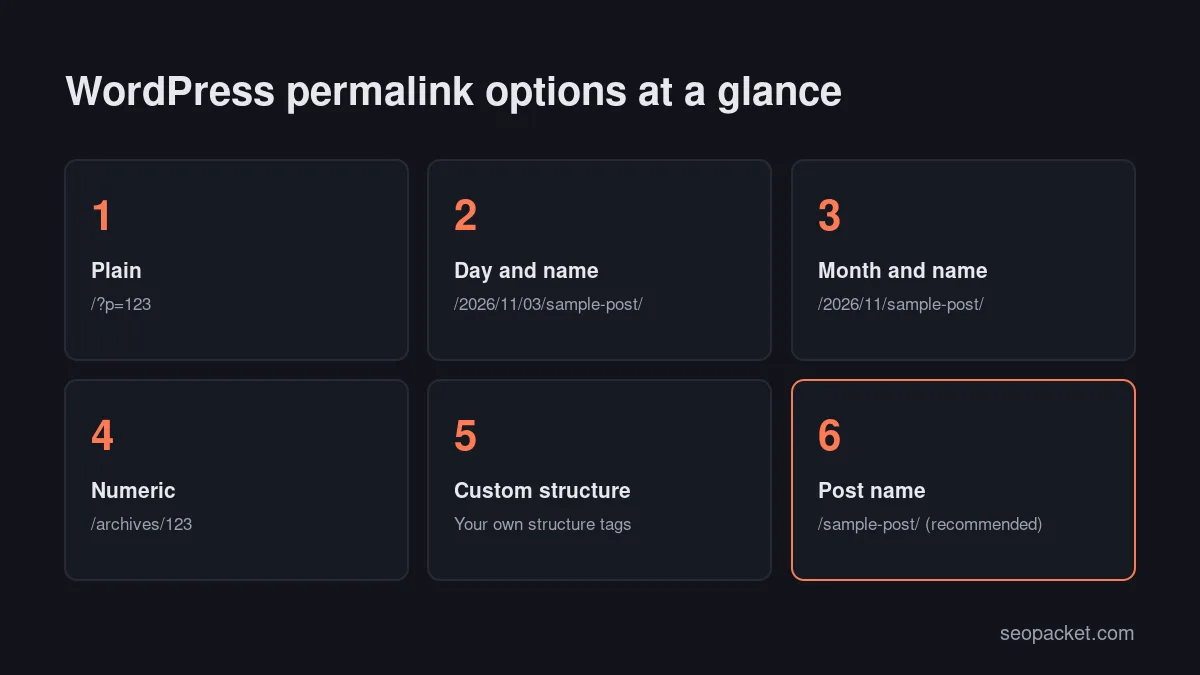
The Settings › Permalinks screen offers six common settings. The official Settings Permalinks screen documentation lists them with examples:
- Plain:
example.com/?p=123. Uses the post ID only. - Day and name:
example.com/2026/11/03/sample-post/. Adds the full publication date. - Month and name:
example.com/2026/11/sample-post/. Adds the year and month. - Numeric:
example.com/archives/123. Uses the post ID inside a fixed path. - Post name:
example.com/sample-post/. Uses the slug only. - Custom structure: any combination of structure tags you type into the box.
A new install usually starts on Plain or Day and name, depending on whether the server supports URL rewriting, so it is worth checking this screen before you publish anything. After you pick an option, click Save Changes. If WordPress can write to .htaccess, you will see “Permalink structure updated.” If it cannot, it shows the rewrite rules you need to paste into the file yourself.
Custom structure tags
A custom structure combines tags such as %year%, %monthnum%, %day%, %post_id%, %postname%, %category% and %author%. WordPress recommends ending the structure with %postname% or %post_id% so every URL points at exactly one post. A common custom choice is /%category%/%postname%/, which puts the category in the URL.
Category base and tag base
The Optional section sets the prefix for category and tag archives. The defaults are category and tag, so archives look like /category/news/. You can change the words, for example to /topics/, but WordPress core does not let you remove the base completely. Some SEO plugins add an option to strip it; if you use one, make sure no page shares a slug with a category, or the two URLs will collide.
What is the best permalink structure for SEO?
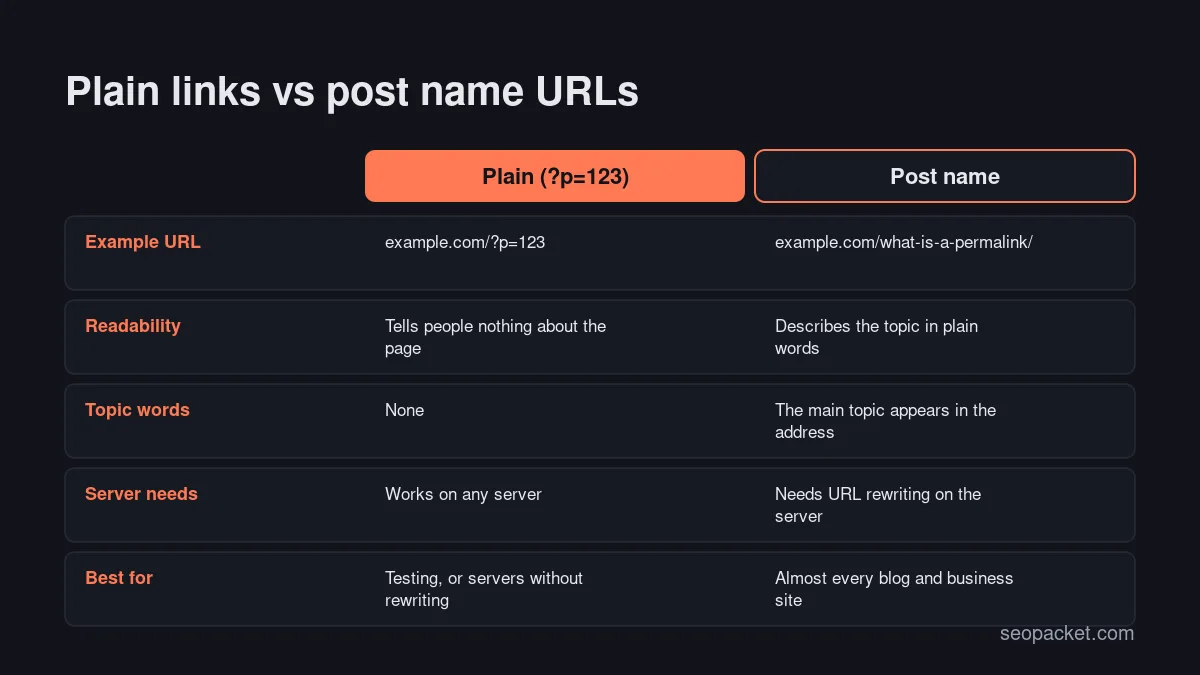
For most WordPress sites, the best permalink structure is Post name (/%postname%/). It produces short, readable URLs that describe the page, contain the main topic words and never look out of date. It also leaves you free to update an article years later without the URL announcing its original publication date.
Google’s URL structure guidelines ask for simple, descriptive URLs with readable words rather than long ID numbers, and recommend separating words with hyphens rather than underscores. Post name URLs meet all of that by default, because WordPress builds slugs from titles with hyphens between words.
Other structures still have a place:
- Category and post name suits large sites with stable, clearly separated sections, because the URL mirrors the site structure. The catch is that recategorising a post changes its URL. If you are planning sections, our guide to SEO silos and site structure explains how to group content first.
- Dates in the URL can suit news sites, where readers expect a timestamp. For evergreen guides they make content look older than it is.
- Plain and Numeric give people and search engines no clue about the page. There is rarely a reason to keep them on a public site.
Trailing slashes follow the structure too. When it ends with a slash, as /%postname%/ does, WordPress redirects the version without the slash to the version with it, so each page keeps a single address. Use the same form in menus, internal links and anything you share, so visitors and crawlers do not pass through an unnecessary redirect.
Planning this early pays off. Soft Learn Hub, the company behind SEOPacket, explains why URL patterns are among the structural decisions that are hard to change once a site is built, which is exactly what happens with permalinks.
How do you write a good permalink slug?
A good slug is short, descriptive and stable: usually three to six words that name the topic, in lowercase, separated by hyphens. WordPress creates one from the post title automatically, but the automatic version is often too long, so it is worth editing before you publish rather than after.
Practical rules for slugs:
- Describe the topic, not the headline. “What Is a Permalink? Everything You Need to Know in 2026” becomes
what-is-a-permalink, not the whole title. - Include the main search term once. There is no need to repeat it or add every variation.
- Avoid years and numbers that age. A slug like
best-tools-2025forces a choice later between an outdated URL and a redirect. - Drop filler words. Words such as “a”, “the” and “of” can usually go, as long as the slug still reads naturally.
- Keep it lowercase with hyphens. Google treats URLs as case-sensitive, so mixed case can create duplicate addresses.
- Use your audience’s language. Non-Latin characters are fine; WordPress keeps them and browsers display them, while the underlying URL is percent-encoded.
You can edit a slug in the post settings sidebar of the block editor, where the URL field sits in the summary panel, or with Quick Edit in the Posts list. Google does not publish a maximum URL length, so treat length as a readability question: if a slug would not fit comfortably in a sentence, shorten it.
Tip: Settle the slug before you publish. Every edit after publication creates a new URL that needs a redirect, and links shared in the meantime point at the old one.
How do you change permalinks on a live site safely?
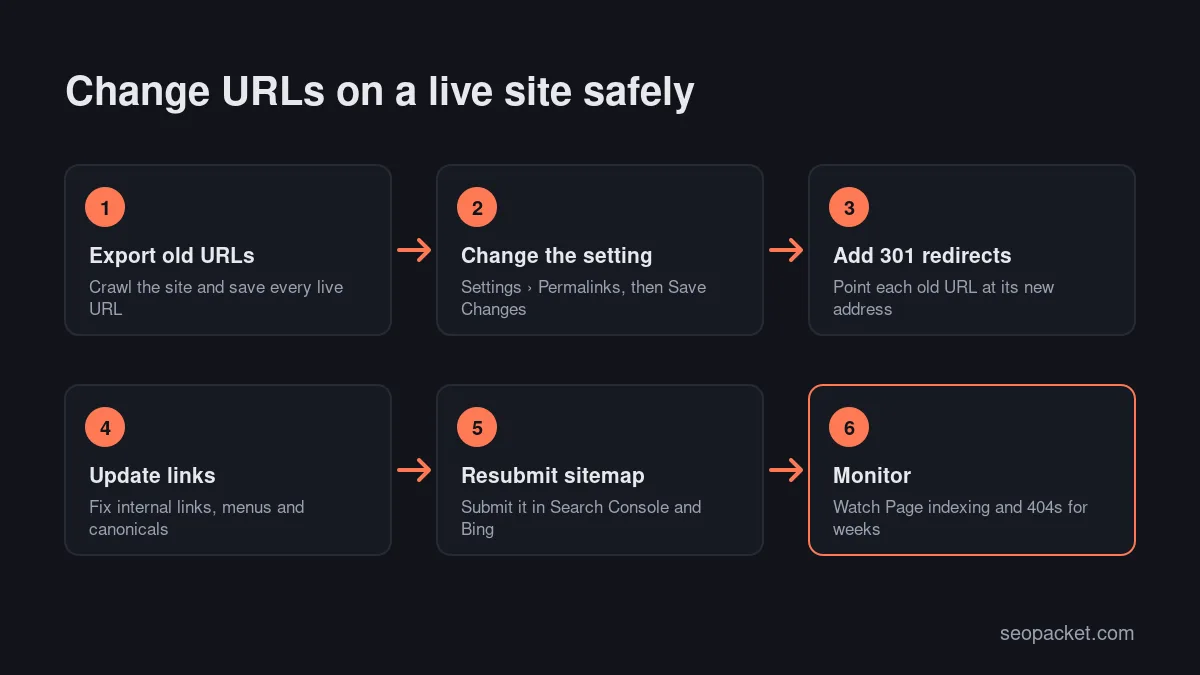
To change permalinks on a live site, first export every current URL, then change the structure, add a 301 redirect from each old URL to its new address, update internal links, resubmit the sitemap and monitor Search Console for errors. Done in that order, links and rankings usually carry over, although search engines need time to process the change.
Google treats a structure change as a site move with URL changes. Its site move guide recommends server-side permanent redirects, one old URL mapped to one new URL, and keeping redirects in place for at least a year. The Change of Address tool is not needed for path changes on the same domain.
- Back up the site and, if you can, test the change on a staging copy first.
- Export every live URL. Use your XML sitemap, a site crawl and the Pages tab of Search Console’s Performance report, so you capture pages that earn traffic.
- Change the setting in Settings › Permalinks and click Save Changes.
- Add 301 redirects. A structure change usually follows a pattern, so one regular-expression rule can cover every post. Moving from Day and name to Post name, for example, needs a rule that sends
^/[0-9]{4}/[0-9]{2}/[0-9]{2}/(.+)$to/$1. The Redirection plugin and Rank Math’s Redirections module both accept rules like this. - Update internal links in content, menus and widgets, so visitors and crawlers do not pass through a redirect on every click. A database search-and-replace tool can rewrite old URLs in bulk; run a dry run first.
- Check canonicals and the sitemap. SEO plugins regenerate both automatically, but confirm that the new URLs appear.
- Resubmit the sitemap in Google Search Console and Bing Webmaster Tools, and inspect a few key URLs. Our guide to getting indexed by Google walks through both.
- Monitor for several weeks. Watch the Page indexing report for “Not found (404)” pages and redirect errors, and fix any old URL that slipped through.
SEOPacket’s free site crawl flags 4xx pages after the change, and its Indexing checks run Google’s URL Inspection on up to 20 pages per click, which is a quick way to see whether Google has picked up the new addresses.
Changing the slug of a single post
Editing one slug is lower risk. When you change the slug of a published post, WordPress remembers the old one and redirects visitors to the new URL. Pages do not get this treatment, and the automatic redirect only covers the slug, so it is still better to add a proper 301 and update internal links that point to the old address.
Common permalink errors and how to fix them
Most of these problems fall into a handful of patterns. Here is how to recognise and fix each one.
404 errors after changing permalinks
If posts return “not found” after a change but the home page works, WordPress’s rewrite rules have not reached the server. Open Settings › Permalinks: the documentation notes that simply visiting the screen flushes the rewrite rules, and saving again does no harm. If that fails:
- Apache: check that
.htaccessexists, is writable and contains the WordPress rules, and that themod_rewritemodule is enabled. - Nginx: there is no
.htaccess, so the server block needs a rule such astry_files $uri $uri/ /index.php?$args;. Ask your host if you cannot edit it. - Caching: purge your caching plugin and CDN, which may still serve old responses.
Old “plain” ?p= links
Links like example.com/?p=123 keep working after you switch to pretty permalinks, because WordPress redirects them to the current URL. They are harmless in old emails or forum posts, but your own menus and content should use the real permalink.
Slugs ending in -2
WordPress adds -2 when another item of the same type already uses the slug. For pages, a media attachment can cause it too, for example an image uploaded as contact.jpg before you created the Contact page. Rename or delete the conflicting item, then edit the slug again.
URLs that change when you edit categories
With %category% in the structure, moving a post to another category or renaming a category changes the post’s URL. Add a redirect each time, or choose a structure without categories if your sections change often.
A 403 error instead of a 404
If old or new URLs return “403 Forbidden” rather than “not found”, the URL setting is rarely the cause. The usual suspects are file permissions, a security plugin rule or an over-strict .htaccess file. Our guide to fixing HTTP 403 errors in WordPress covers the checks in the order to try them.
For a wider list of crawl and indexing checks, including redirect chains and broken links, work through our technical SEO checklist.
How do permalinks work on multilingual sites?
On a multilingual WordPress site, each language version needs its own URL, usually in a language directory such as /fr/ or /de/, on a subdomain, or on a separate domain. Translating the slug as well makes the URL readable for each audience and matches the words they search with.
Google recommends separate URLs for each language rather than switching content with cookies or browser settings, and its guide to multi-regional and multilingual sites compares directories, subdomains and country domains. URL parameters such as ?lang=fr are not recommended.
Multilingual plugins such as WPML and Polylang let you choose between these patterns and translate slugs per language. Whichever you pick, add hreflang annotations so search engines can match each version to its audience, and avoid redirecting visitors automatically based on a guessed language.
A permalink checklist for new WordPress sites
Before you publish your first post, run through this short list:
- Set Settings › Permalinks to Post name, or a custom structure you have a clear reason for.
- Decide on category and tag bases now, not after launch.
- Edit each slug before publishing: short, lowercase, hyphenated, no year.
- Install an SEO plugin that handles sitemaps, canonicals and redirects; our roundup of WordPress SEO plugins compares the main options.
- Keep a redirect log, so every future URL change gets a 301 on the same day.
Get these settings right on day one and you may never need to touch them again, which is exactly what a permanent link should allow.
Frequently asked questions
What is a permalink in simple terms?
A permalink is the permanent web address of one specific page, post or record. It is the link people bookmark and share, and the one search engines index, so it should not change once the content is published.
What is the best permalink structure for WordPress?
Post name (/%postname%/) is the best choice for most sites. It creates short, readable URLs that describe the content and do not date. Large sites with stable sections sometimes add the category, but that ties each URL to a category that may change.
Does changing permalinks hurt SEO?
It can if you change URLs without redirects, because every old link and indexed page then returns a 404. With a 301 redirect from each old URL to its new address, updated internal links and a resubmitted sitemap, rankings usually carry over, although Google may take some weeks to process the change.
Why do I get 404 errors after changing WordPress permalinks?
Usually because the server is not applying WordPress’s rewrite rules. Visit Settings › Permalinks to flush them, check that .htaccess is writable and mod_rewrite is enabled on Apache, or add the WordPress try_files rule on Nginx, then clear any cache.
Can I remove the category base from WordPress URLs?
WordPress core lets you rename the category base but not remove it. Some SEO plugins can strip it, which gives shorter archive URLs, but you then need to avoid pages and categories with the same slug.
Should permalinks include dates?
Only if readers expect them, as on a news site. For guides and evergreen articles, dates make content look old and make updates awkward, so a structure without dates is usually the better choice.

Leave a Reply