

- Local SEO tools help a business appear in Google Maps, the local pack and nearby searches by managing its Business Profile, listings, reviews, rankings and website.
- The free local SEO tools that cover most single-location businesses are Google Business Profile, Search Console, PageSpeed Insights, Bing Places for Business, Apple Business and the Rich Results Test.
- Paid local SEO software earns its cost when you manage many locations or clients, need rank grids, or want citation and review work done at scale.
- Local SEO tools can’t buy a better ranking. Google ranks local results on relevance, distance and prominence, so tools only help you do the real work faster.
Local SEO tools are the apps and services that help a business appear in Google Maps, the local pack and “near me” searches by managing its Business Profile, listings, reviews, local rankings and website. For most single-location businesses, the best local SEO tools are free ones from Google, Bing and Apple; paid local SEO software earns its cost once you manage many locations or clients.
This guide groups the tools by the job they do rather than by brand, so you can see which gaps you actually need to fill. Features and plans change often, so each tool is described as it is at the time of writing, with a link to its official site. If you want the step-by-step process for checking a local website, follow our local SEO audit guide; this post is about the tools you use along the way.
In this local SEO tools guide
What are local SEO tools?
Local SEO tools are software and services that help a business with premises or a service area rank in map and local search results. They manage business listings, collect and monitor reviews, measure rankings from different locations, research local keywords and check the website that supports the listing.
Definition: Local SEO is the work of improving how a business appears for searches with local intent, such as “plumber near me” or “dentist in Leeds”. It covers the Business Profile, directory listings (citations), reviews, the website and links from the local community.
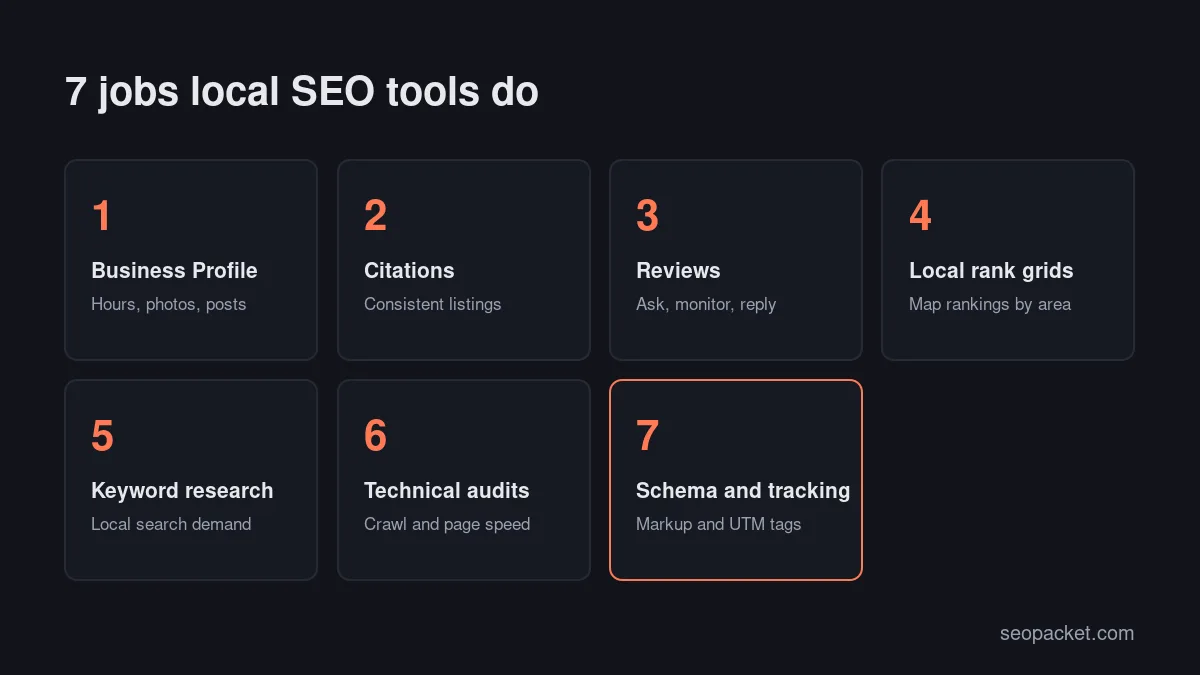
Most local SEO tools do one of seven jobs:
- Business Profile management: keeping hours, categories, photos and posts accurate.
- Citations and listings: making your name, address and phone number consistent across directories.
- Reviews: asking for reviews, monitoring them and replying.
- Local rank grids: checking map rankings from many points across an area.
- Local keyword research: finding how people search for your services nearby.
- Technical audits: crawling the website and checking speed.
- Schema and tracking: adding structured data and measuring clicks from your profile.
How does Google rank local results?
Google ranks local results mainly on relevance, distance and prominence, according to its own tips to improve your local ranking. Relevance is how well a profile matches the search, distance is how far the business is from the searcher, and prominence is how well known the business is.
This matters when you pick local SEO tools, because each tool works on one of those factors. Profile and website tools improve relevance. Rank grids measure the effect of distance, which you can’t change. Review, citation and link tools build prominence. Google also says there is no way to request or pay for a better local ranking, so be wary of any tool or service that implies otherwise.
The free local SEO tools every business should set up
You can cover most local SEO work with six free tools: Google Business Profile, Google Search Console, PageSpeed Insights, Bing Places for Business, Apple Business and Google’s Rich Results Test. Set these up before paying for any local SEO software, because most paid tools build on the same profiles and data.
Google Business Profile
Google Business Profile is the free listing behind your business’s appearance in Google Search and Maps, and it is the single most important of all local SEO tools. You set categories, hours, services and photos, publish updates, reply to reviews, and see how people found you and what they did next, such as calls, direction requests and website clicks.
Follow Google’s guidelines for representing your business: use your real-world business name, a genuine address or service area, and categories that describe your core business. Adding keywords to the business name breaks those guidelines and can put the profile at risk of suspension.
Google Search Console
Google Search Console shows which searches bring people to your website, including queries that contain town names or “near me”. Filter the Performance report by a place name to see the local demand you already rank for, and use the Page indexing report to confirm that your location and service pages are indexed. Our guide to getting indexed by Google explains what to do when they are not.
PageSpeed Insights
PageSpeed Insights tests a page’s loading speed and Core Web Vitals on mobile and desktop. Many local searches happen on phones, often on the move, so test your homepage and your main service or location pages first.
Bing Places for Business
Bing Places for Business is Microsoft’s free tool for listing your business in Bing Search and Bing Maps. Microsoft relaunched it in October 2025, and at the time of writing it can import your details from Google Business Profile, so setup is quick once your Google profile is accurate.
Apple Business
Apple Business replaced Apple Business Connect in 2026. At the time of writing, it lets you claim your location and control the logo, hours, photos and key details shown on your place card in Apple Maps, free of charge. iPhone owners who search in Maps see this card, not your Google profile.
Rich Results Test and Schema Markup Validator
Google’s Rich Results Test checks whether the structured data on a page is valid for Google’s rich results, and the Schema Markup Validator checks any schema.org markup. Our Google Rich Results Test guide explains how to read the report and fix common errors.
Quick answer: If you run one location, the free toolkit plus a simple spreadsheet for citations and reviews covers almost everything. Add paid local SEO software when you manage several locations, need rank grids, or report to clients every month.
The best local SEO tools by job
When the free toolkit isn’t enough, choose paid tools by the job you need done rather than by the longest feature list. The best local SEO tools below are grouped that way. Plans, prices and features change often, so check each official site before you buy.
Local SEO software for Business Profiles at scale
Managing one Business Profile in Google’s own dashboard is easy; managing twenty is not. Multi-location platforms let you update hours, publish posts and watch for unwanted edits from one place.
- BrightLocal is an all-in-one local platform covering local rank tracking, a Local Search Grid, listings management, citation tracking and review tools. At the time of writing, it offers a free trial.
- Semrush Local is Semrush’s local suite for managing Business Profiles, online listings and reviews, with local competitor data.
- Moz Local focuses on listings management and monitoring listing health.
- Yext is aimed at large multi-location brands, with listings, reviews, location pages and AI search visibility in one platform.
Local SEO tools for citations and listings
A citation is any online mention of your business name, address and phone number, usually in a directory, map app or industry site. Consistent citations make it easier for customers, and for the platforms that share business data, to trust that your details are correct.
- Whitespark offers the Local Citation Finder, which shows where you and your competitors are listed, plus a citation building and cleanup service.
- BrightLocal’s Citation Tracker and Citation Builder cover the same job inside its platform.
- Moz Local, Semrush Local and Yext let you manage listings on supported directories from one dashboard.
For a single location, a manual list of the most relevant directories for your country and trade is often enough. Paid citation tools save the most time when you are cleaning up old addresses or phone numbers across many sites.
Local SEO tools for reviews
Review tools help you ask for reviews, see new ones across several sites and reply quickly. Start with the free review link or QR code that Google Business Profile can create for you; Google’s tips to get more reviews cover how to ask.
- GatherUp is review and reputation management software for local businesses and agencies.
- BrightLocal and Whitespark’s Reputation Builder add review requests and monitoring to their local suites.
Watch out: Google’s Maps content policy bans offering incentives for reviews and bars businesses from discouraging negative reviews or selectively asking only happy customers. Avoid any review tool feature that filters customers before they reach Google, often called “review gating”.
Local rank grids
A local rank grid checks your map ranking for one keyword from many points across an area and shows the results as a coloured map. It is the clearest way to see the distance factor: you may rank first near your premises and drop out of the top results a mile away.
- Local Falcon runs geo-grid scans for Google Business Profile and, at the time of writing, also tracks visibility in AI search tools. It offers a free sign-up with starter credits.
- BrightLocal’s Local Search Grid and Whitespark’s Local Ranking Grids do the same job inside their suites.
Rank grids are where paid local SEO tools pull furthest ahead of free ones. Grid scans usually use credits or plan allowances, so track a handful of high-value searches once a month rather than every keyword every day.
Local keyword research
Local keyword research finds the words people use when they search for your services in your area. Start with free sources: Google’s autocomplete suggestions, the queries in Search Console and Google Keyword Planner, which lets you set target locations. You need a Google Ads account to use Keyword Planner.
Paid local SEO tools add search volume estimates by city, but volumes for small towns are often low and rounded, so treat them as a direction rather than an exact count.
Technical audits
Your website still does much of the work: location pages, service pages, speed and crawlability all feed relevance. General crawlers do this job well, so you don’t need local SEO software here. Screaming Frog SEO Spider is a desktop crawler that is free for up to 500 URLs at the time of writing.
SEOPacket’s free site crawl covers up to 500 pages by default, or up to 10,000 for a verified site, and its Page speed checks run on Google PageSpeed Insights. Our technical SEO checklist lists what to fix once the crawl finishes.
Schema and tracking
LocalBusiness structured data describes your name, address, opening hours and other details in a format search engines can read reliably. Google’s LocalBusiness structured data documentation lists the required and recommended properties; validate your markup with the Rich Results Test after every template change.
For tracking, add UTM parameters to the website link in your Business Profile, for example ?utm_source=google&utm_medium=organic&utm_campaign=gbp. Your analytics tool can then separate profile clicks from other organic visits.
Local SEO tools comparison table
This table summarises the local SEO tools in this guide. “Free option” describes what was offered at the time of writing; always confirm on the official site.
| Tool | Main job | Best for | Free option |
|---|---|---|---|
| Google Business Profile | Profile, reviews, insights | Every local business | Free |
| Google Search Console | Search queries, indexing | Every website | Free |
| Bing Places for Business | Bing and Bing Maps listing | Every local business | Free |
| Apple Business | Apple Maps place card | Every local business | Free |
| BrightLocal | Rank grids, listings, reviews | Small businesses and agencies | Free trial |
| Whitespark | Citations, rank grids, reviews | Citation clean-up and agencies | Some free tools |
| Local Falcon | Geo-grid rank tracking | Map ranking checks | Free sign-up credits |
| Semrush Local | Profiles, listings, reviews | Teams already using Semrush | Paid |
| Moz Local | Listings management | Multi-location listings | Paid |
| Yext | Listings, reviews, pages | Large multi-location brands | Paid |
| GatherUp | Review requests and monitoring | Review-led businesses | Paid |
| Screaming Frog | Website crawling | Technical audits | Up to 500 URLs |
| SEOPacket | Site crawl, audits, client reports | The website side of local SEO | Free crawl and $1 credit |
Free toolkit vs paid local SEO software
Free tools give you the same core data that paid local SEO software uses: your profile, your search queries and your page speed. What you pay for is time saved, data collected from many locations at once, and reports that are ready to send.
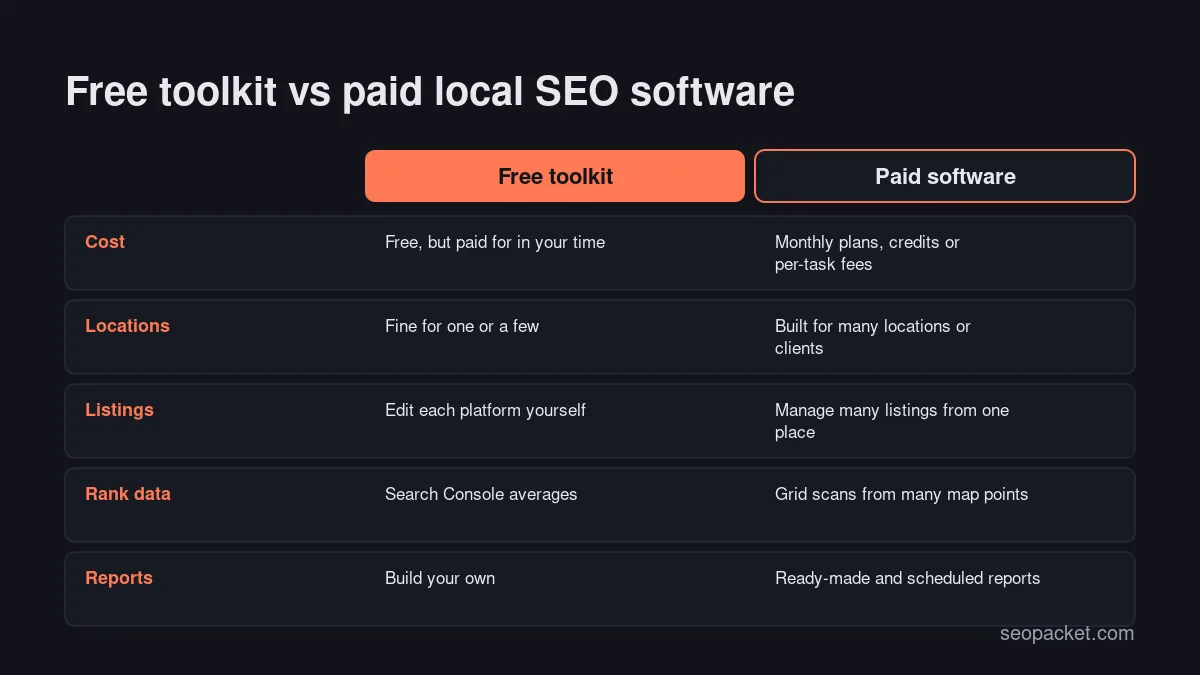
The question to ask is not “which tool is best?” but “which task takes me the longest every month?” If that is updating ten profiles, buy profile management. If it is proving results to clients, buy reporting. If it is guessing how you rank across town, buy rank grids.
How do you choose local SEO software for your business size?
Choose local SEO software by the number of locations you manage and who needs the reports. A single shop or trade business rarely needs more than the free toolkit, multi-location brands need central listing management, and agencies need rank grids, review monitoring and client-ready reports.
Single-location businesses
Stick with the free local SEO tools and spend your effort on the profile, reviews and website. If you want one paid tool, a rank grid tool that you run monthly gives you the clearest view of how far your visibility reaches.
Multi-location businesses
Local SEO software with central listing management becomes worth paying for once hours, phone numbers or opening dates change across many sites. Look for bulk editing, alerts for unwanted edits, and reports by location.
Agencies and freelancers
Agencies need local SEO software that separates clients cleanly, scales rank grids and produces reports clients can read. SEOPacket’s white-label client reports (PDF, HTML or a private link) cover the website side. If you are weighing tools against hiring help, Soft Learn Hub, the company behind SEOPacket, explains what local SEO services include and how to choose a provider.
How to set up free local SEO tools in one afternoon
You can set up the core free toolkit in a few hours. Work in this order, because later steps reuse the details you confirm in earlier ones.
- Claim and verify your Google Business Profile. Check the name, address or service area, phone number, primary category, hours and website link.
- Import the profile into Bing Places for Business. Review every imported field rather than assuming it copied correctly.
- Claim your location in Apple Business. Add the same logo, hours and photos so your details match.
- Verify your website in Search Console. Submit your sitemap and check that location and service pages are indexed.
- Test your key pages in PageSpeed Insights. Start with the homepage and the page your profile links to.
- Add LocalBusiness structured data. Validate it with the Rich Results Test and fix any errors.
- Tag your profile’s website link with UTM parameters. This lets you measure visits from the profile separately.
- Create your review link and start asking. Ask every customer the same way, without incentives or filtering.
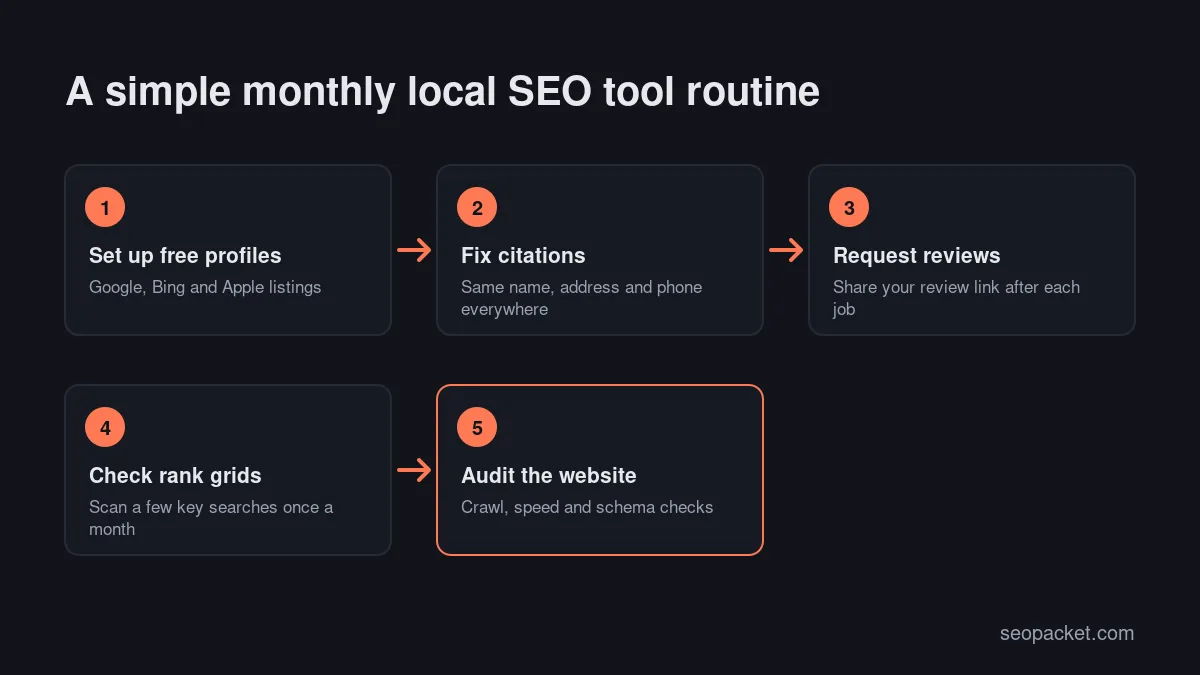
Once this is in place, a light monthly routine keeps it working: check listings for unwanted edits, reply to new reviews, run a rank grid for your main searches and crawl the website for broken pages.
Common mistakes with local SEO tools
- Buying software before fixing the basics. No tool makes up for a wrong category, an outdated phone number or an empty profile.
- Ignoring Bing and Apple. They are free, quick to set up and reach people who never open Google Maps.
- Trusting one manual search. Results change with the searcher’s location, so a check from your own office says little about the rest of town.
- Tracking too many keywords too often. A few high-value searches each month tell you more than hundreds of daily checks.
- Using review gating. Filtering unhappy customers away from Google breaks Google’s policy and can cost you reviews.
The best local SEO tools are the ones that save you time on the jobs you repeat every month. Start free, measure what slows you down, and add paid tools one job at a time. For the wider picture, our SEO checklist covers everything beyond local search.
Frequently asked questions
What are the best free local SEO tools?
The best free local SEO tools are Google Business Profile, Google Search Console, PageSpeed Insights, Bing Places for Business, Apple Business and Google’s Rich Results Test. Together they cover your listings, search data, page speed and structured data at no cost.
Do I need paid local SEO software for one location?
Usually not. One location can be managed well with the free toolkit and a spreadsheet for citations and reviews. A monthly rank grid tool is the most useful paid add-on if you want to see how your map visibility changes across your area.
What is a rank grid in local SEO tools?
A local rank grid checks where your business ranks in map results for one keyword from many points across an area. The results appear as a coloured map, which shows how your visibility falls away with distance.
Are citations still important for local SEO?
Consistent citations help customers and data platforms trust your name, address and phone number. They matter most when your details have changed, for example after a move, because old information can linger on many sites.
Can local SEO tools guarantee a higher ranking in Google Maps?
No. Google says there is no way to request or pay for a better local ranking. Tools help you improve relevance and prominence and measure the results, but the ranking itself depends on Google’s systems.
Which local SEO tools do agencies need?
Agencies usually need a rank grid tool, review monitoring, listing management for multi-location clients and client-ready reports. Start each client on the free toolkit, then add paid local SEO software where it saves the most time across accounts.

Leave a Reply